Life, Technology, and Meteorology

Category: Macintosh (Page 5 of 6)

A few belated updates…

I just wanted to point out a couple of apps that were updated in the past week or two. Both of these I use quite a bit, and get my highest recommendations.

The first is DesktopSweeper by Philippe Martin. I’ve been using this haxie since the first beta versions, and it’s definitely helped keep my desktop cleaner. Basically, it’s main function is to hide all of the icons on your desktop when you aren’t specifically in the Finder. When the Finder is your frontmost application, all of your icons are there, but when you switch away to do something else, DesktopSweeper will hide all the icons so they aren’t still cluttering your screen. It’s also nice because you can set a delay for how long to wait before hiding the icons. This makes it easy to be in the Finder, switch to another app to start a drag operation and drop it before the icons are hidden again. Version 1.1 was posted last week, so check it out.

The next app that I happen to be using right now is Blapp by Michael McCracken. Blapp is an app for all those bloggers out there using Blosxom. Editing is done in a nice split window where you can edit the source of the blog entry and see it rendered in HTML in real time on the other side of the window. Everything is made very robust, and setting up the configuration to sync with your blog is easy. Here is a link to the official Blapp page, but there isn’t an updated link to the version 7 download, so I included the link above where you can download the latest.

CRM for MacOS X

For awhile, I was considered designing a CRM application for the Mac as my next software release. Well, it’s a good thing I haven’t invested any time into it yet, because these guys beat me to it, and their app’s functionality is almost exactly what I had in mind. The application is called Crm4Mac, and it’s released by a small European company called ibizzi. Basically, it keeps all of your contacts, calendars, and mail within the standard Apple apps (Address Book, iCal, and Mail.app), but it provides a way for you to relate items with each other. This way, you can use all the standard iSync and .Mac backup and sharing utilities without having to duplicate the data in a CRM application. You can also attach documents to any contact or group. Overall, it looks pretty cool.

Today they released 1.0b8, and according to their website, they expect to finish 1.0 sometime this month.

WWDC 2004

Buzz Andersen mentioned in his blog that there should be a get-together for Mac bloggers at WWDC this year. I’m all for it. Last year I met a lot of great developers at the MacOS X Conference (some of which are mentioned in the links in the sidebar), and I hope to do the same this year at WWDC.

I’m pretty excited about going to this year’s event. I’ve never been to WWDC before, but every year I hear great things about it, and wish that I could have went. Apple recently posted a partial listing of the conference sessions, and a lot of them look to be very good. I’m hoping they release some good hardware there too, as I want to get a new G5 and I’m waiting for the next revision to come out. 🙂

Quicksilver

I’m a total LaunchBar fanatic. Since I started using it last year, it has become an indispensable tool on my Powerbook, and I’m caught by surprise when I use another Mac that doesn’t have it installed.

Today I was browsing this forum over at MacNN and noticed some people mentioning a new launch manager similar to LaunchBar, called Quicksilver. I decided to check it out, and it looks like it has a lot of potential. They are still in the beta stage of the project (beta 19 is the most current), but it seems to work well, and has a nice interface too. The only problem that I’ve found with it is that it’s not fast enough. I might just be spoiled by LaunchBar’s speed, but now I expect a launcher to be ready to go as soon as I hit command-space. Launching a utility in LaunchBar takes less than a second, but Quicksilver takes a second or two just to display, and another couple of seconds for me to type in a shortcut and find what I want. In the long run, things will keep getting faster though, so it’s probably nothing to worry about.

Anyway, check it out here if you’re interested. The best part about Quicksilver is the price…free!

DesktopSweeper 1.0b1

Philippe Martin released an initial version of his haxie called DesktopSweeper a couple of days ago. DesktopSweeper allows you to toggle whether or not your desktop icons are displayed. To me, this is very useful since I don’t like having a lot of clutter on my desktop, but I still want to have shortcuts there to my most often used locations on the file system. The key combination used to toggle whether or not the icons are shown is configurable, but is set to command-enter by default. Hit that key combo once, and it hides all your icons, leaving a nice clean desktop. Hit it again, and all your icons show up again right where you left them. Response time is fast, and you don’t have to be in the Finder to use the key combination.

This is the most useful utility I’ve seen since I discovered LaunchBar 6 months ago. I also want to mention that I’ve had the pleasure of knowing Philippe for quite awhile now. He has given me a lot of input and ideas for XRG since the early days, and he does a great job of picking out small interface bugs and pointing out how things on XRG’s interface should work. Anyway, if you have a Mac, check out DesktopSweeper.

teleport

I came across this application called teleport for MacOS X. Basically, it works as a software KVM switch between two computers. You configure one Mac as the server, and the other as the client, and when you move your mouse to an edge of a screen on one computer, it will appear on the other computer and send all keyboard events there as well. Kind of like having multiple monitors, except with multiple computers as well. I never would of thought of doing something like this in software. This type of application has a ton of potential. I hope the developer keeps on it, as right now the released version is “Public Preview 1.”

Desktop Manager 0.5.0

Rich Wareham released Desktop Manager 0.5.0 today. Here’s a quick list of new features.

  • New plugin-based system — almost all user-visible functionality is implemented by plugins.
  • New preferences pane — more like System Preferences.
  • Active screen edges — configurable, switching may be triggered by moving to screen edge.
  • Desktop-based pager — An often reqested feature. A desktop pager compatible with CodeTek VirtualDesktop(TM) skins.
  • Desktop switch transitions — Eight eye-candy switches for your enjoyment [EXPERIMENTAL].
  • Preliminary sticky window support — There is some code for sticky windows available. Currently it is used to make all panels sticky. This will be configurable in future [EXPERIMENTAL].
  • Other non-user-visible bug fixes and optimisations.

I’ve been using Desktop Manager since the 0.3.1 release, and in my opinion it’s the best virtual desktop tool available for MacOS X. It’s very light on resources, and the feature-set is almost exactly what I’m looking for (total sticky window support would be great for XRG). Anyway, if you have a Mac, check it out.

New Apple Products

I have to say that I was a little disappointed with the new hardware offerings that Apple introduced at MacWorld yesterday. I was expecting a new machine that was kind of “out there” to celebrate the 20th Anniversary of the Macintosh. A few years ago (1997 I think), Apple released the 20th Anniversary Macintosh to celebrate 20 years of being in business. It would have made more sense to call this the 20th Anniversary Apple, or something different so they would be able to ship a real 20th Anniversary Mac this year. For it’s time though, the 20th Anniversary Mac was “out there” compared to the more boring machines of it’s time. It was no speed demon, but it’s design was top notch.

Instead, we got new iPod minis and a new G5 XServe. Both of these are pretty nice products, but it just wasn’t what I was expecting.

I think the iPod minis miss their intended market slightly. Apple wanted to have competition in the high-end flash card MP3 player market. The iPod mini does do very well when you just look at it in a narrow field of high-end flash players. However, I wouldn’t buy one at the price that they set for it. $249 for a 4Gb player? Yes it’s only $50 more than Rio’s 256Mb offering, but the 15Gb iPod is only $50 more for almost 4 times the storage. Give me that amount of space for $150-200 and you have a sale.

The XServe G5 looks like a pretty nice machine. Being able to get dual G5s cooled enough to run in a 1U rack gives me hope that we’ll see a G5 Powerbook soon. Then again, they had to put 7 fans in there to do it…

PhotoStickies and Tailer+

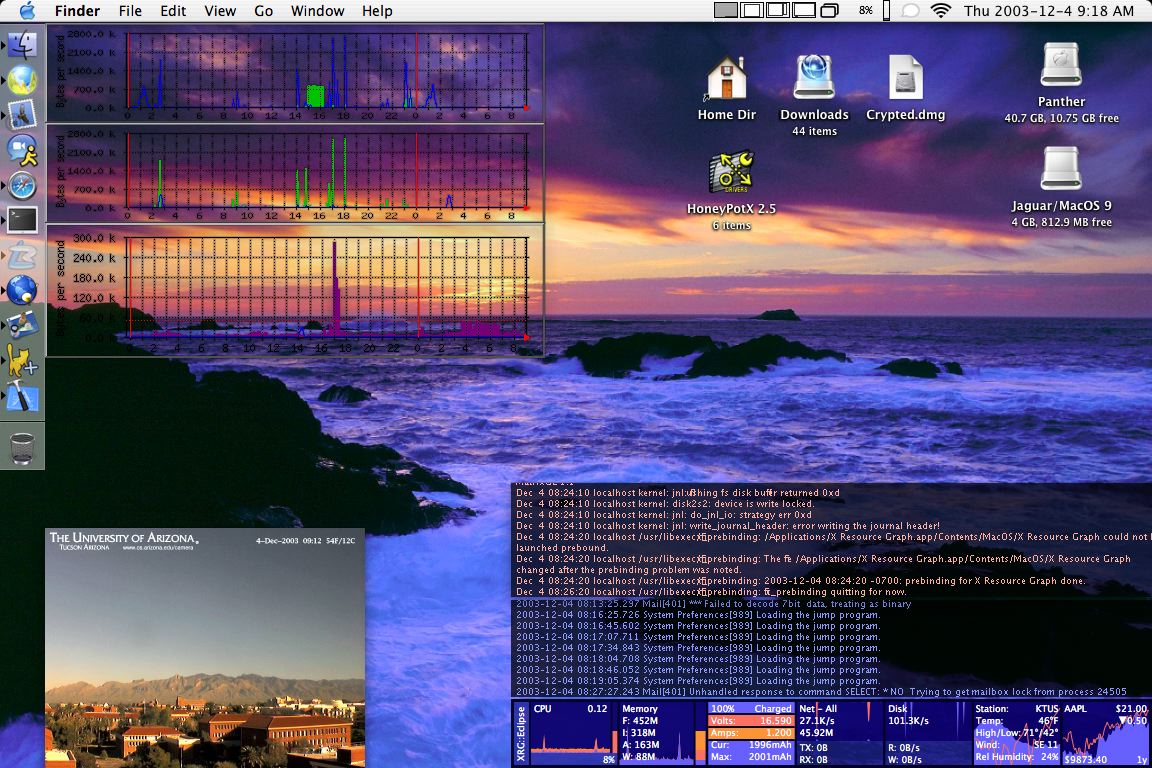
In the past couple of days I have discovered 2 pretty cool Shareware/Freeware applications for MacOS X. Short descriptions follow along with a screenshot.

The first is a freeware application called PhotoStickies by Christian Grunenberg. PhotoStickies allows you to show images in borderless windows. You can open either a local image or a image hosted on the web, and the nice part is that you can set a refresh time for that image. This is perfect if you want to monitor a webcam or system monitor graphs and don’t want to fill your desktop with several web windows. Another plus to this app is that you can order the windows to be below all others, so they aren’t getting in your way all the time.

The second app is shareware ($15) and is called Tailer+ by Chris Schleifer. Tailer+ allows you to display borderless text windows and either get the text from a command, or “tail” a file on the hard drive. The unregistered version allows up to 3 windows. Registering the app will remove that limitation. This application is still fairly new, but so far it’s looking pretty good and I’ve only found a few minor bugs.

Here’s a screenshot of both programs running on my Powerbook. In the top left corner, you can see 3 PhotoStickies windows monitoring various network bandwidth graphs created by MRTG. Then in the lower left corner I have a PhotoSticky of a webcam in the CS department here at the University of Arizona. It acts as my “window” here at the office since I don’t have one otherwise. 🙂 In the lower right corner there are two Tailer+ windows (one tailing my system.log, and the other tailing my console.log), and of course I have XRG on the bottom.

« Older posts Newer posts »

© 2026 *Coder Blog

Theme by Anders NorenUp ↑