Life, Technology, and Meteorology

Category: Seasonality (Page 6 of 6)

FMDatabase

Gus posted a very cool SQLite Objective-C wrapper, complete with sample code. It looks like the methods he has in there are pretty handy. Seasonality uses SQLite as it’s database engine, though at the time I was developing it, the only good wrapper I found was for SQLite 2.8.x, so I went for that. I might end up switching to SQLite 3 in a later version, but we’ll have to see. Since the database files are a completely different format between SQLite 2.8 and SQLite 3.x, there would definitely be some work involved in the upgrade.

I figured this would be a good opportunity to talk more about the database aspects of Seasonality. Seasonality actually uses 2 SQLite databases, one of them is the location database in the application bundle, and the other is stored in the users Application Support directory (~/Library/Application Support/Seasonality). The database in the application bundle is really only used as a read-only database, and it contains all of the locations and their associated data values. When you start typing in a zip code to add a location in Seasonality, the app is actually just running a quick SELECT query from the string you’ve typed so far. There are a few different tables in the location database to associate zip codes to ICAO weather locations and radar locations, but overall it’s a pretty simple database. This is actually a subset of all the data that I’ve mined over the past several months…the master is residing in a PostgreSQL database on one of my servers here, and I wrote a Perl script to select subsets of the data from Postgres and insert them into a new SQLite database to include in Seasonality.

The second database in Application Support is used to store all the saved weather data. There are several fields that are saved for future functionality if needed. Other than the temperature, dewpoint, wind and gust speeds used for the graphs right now, Seasonality saves the air pressure, relative humidity, and the visibility along with the date that data is associated with. This brings up a minor complaint of mine…SQLite is typeless, which means that it treats all values you put in the database as the same type. Integers, Floats, and Dates are all inserted as simple strings. They claim this is a feature, but when it comes to date processing it’s a major pain.

When selecting data to build a weather graph, I want to select data that is between two dates. Unfortunately, if I just use a standard date string like Tue Mar 22 22:45:16 EST 2005, it will choke when I try to do a date comparison because it will look at it as a string and, for example, Fri Mar 25 22:45:16 EST 2005 would be seen as happening before the first date because F in Fri is alphabetically before T in Tue. One way around this is to use a very large integer for the date string: 20050322224516. This works fine, and is the method that Seasonality uses to keep track of dates, but it’s slightly inconvenient because all values are above 2^32, so you need to remember to use 64 bit integers to pass dates in and out of the database.

Back to the second database, that’s all there is at the moment…just that one table with a ton of rows in it. Each row takes maybe 100 bytes, and with an average of around 30 rows a day per a location you end up with a database that is about 1Mb after a year’s time (per location). Not bad at all for the amount of data being saved. Searching it is pretty quick too…my database at the moment has about 11,000 rows in it (data for 5 locations back through the beginning of February), and searching through it takes a fraction of a second. In later versions of Seasonality, I might add a way for users to manage this data a bit better. For instance, exporting the data seems like something that user might want to do, and maybe add some AppleScript handling as well. We’ll see where it goes…
Seasonality 1.0 Released

After months of work, Seasonality 1.0 is finally ready for public consumption. Here’s some information from the press release:

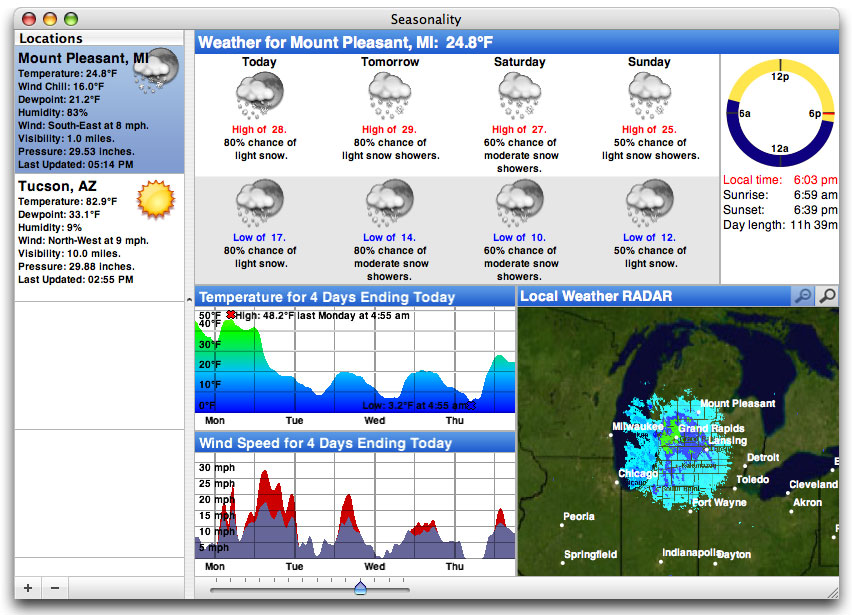
Gaucho Software is pleased to introduce Seasonality 1.0. Seasonality takes weather monitoring to a whole new level with weather forecasts, radar images, sunrise/sunset times, and much more. View informative icons demonstrating what weather is coming your way over the next 7 days. Use radar images to check out where it is raining or snowing. Compare this month’s weather conditions to last month’s, or even last year’s. Keep track of just your hometown or multiple cities all over the U.S.

Some key features of Seasonality 1.0 include:

  • 7 day forecast with high/low temperatures and probability of precipitation.
  • Local radar image showing current precipitation.
  • Graphs of previous temperatures and wind speeds.
  • Daily sunrise and sunset times, along with the length of day.
  • Monitor multiple locations.
  • Automatically saves weather data to allow viewing of past conditions.

Definitely take a look at the Seasonality website. Try it out and let me know what you think!

Seasonality Finishing Touches

Seasonality is coming along really well, and I expect to release sometime before the end of next week. The code is done (unless I find any more bugs), and now I’m in the process of finishing up the business and web aspects of the application.

Releasing XRG was a piece of cake compared to the preparation required to release an application to sell. The XRG release just involved creating a DMG of the application, throwing together a simple website to download from, and sending emails to various sites to announce the release. At the time it seemed like a big deal, but looking back it was fairly low-stress. If something didn’t work, then it didn’t matter too much because XRG is free. 🙂

With Seasonality, I want the first release to go perfectly. I know it won’t, but if I try to make it perfect then hopefully I won’t hit far from the mark. There’s also all the work of actually selling the app. I’ve posted about registering Gaucho Software as a business, but there are other business aspects to take care of like registering with a sales company (in this case, eSellerate) to handle license registration, setting up an online store that works well and looks good, creating a web site that does a good job of communicating the coolness of the product, finding a hosting provider to offer the downloads (read about the great download fiasco of January 2005), and testing the hell out of the app.

Most of these I have been taking care of during the past week. eSellerate setup has been pretty nice, as they have a great web admin tool to help set up an online store. Configuring the templates for the online store has been more time consuming than I thought it would be, but I think it’s starting to look pretty good. Added registration code to the application was a new experience. Since I’ve never done this before, I’m a little concerned that I’m overlooking something and my app will be easy to crack. I’m probably worrying more about this than I should be. I’ve also been putting a lot of time into the product website, but I still have some more work to do in that respect.

For the hosting provider, I ended up going with Site5. After checking out some reviews, they got pretty high marks and they offered everything I was looking for except for mod_perl (and offer some cool things that I wasn’t looking for, like a dedicated IP just for my account). I signed up for an account on Sunday night, and they had it configured and ready to go within 15 minutes, which really impressed me considering I was signing up during off-hours. I scped all the files on download.gauchosoft.com over there, switched DNS, and everything seems to be working well. The box I’m on seems like it’s pretty new: quad 2.8Ghz Xeons with 2Gb of RAM, 3x160Gb drives, and a load that hovers around 0.1. I’m curious how far they will load up the machine before moving on to another host. From their other server stats though, it looks like they keep most of them with a load of 2-3 and only about half usage on the disk, so I’m thinking that kind of box should be able to handle a similar load without any problems.

Now all that’s left is testing the hell out of the app…and documentation. Bah, that’s gotta be the worse part of development. I’ve been putting off writing the Help and Readme files for days and now it’s to the point where I just need to sit down and take care of it.

I thought I would post a sneak peak of the Seasonality interface for all 3 of my loyal readers…so here’s a screenshot: (click for a full size version)

Last Minute Design Changes

It’s really quite amazing to me just how many semi-major design changes can come up when nearing the end of an initial development cycle. Seasonality, for instance, has had quite a list of things come up just in the past few days, even though I “froze” the features I would include over a week ago.

One of them is a URL Manager. For each weather location that Seasonality monitors, it makes 4 different network connections to download weather data. This is fine when you only have 1 or 2 locations, but when I use it with 5 locations Seasonality creates 20 background threads to download data, which is far from ideal. One of today’s tasks is to create a class to buffer the amount of connections that are active and give one more layer of abstraction from the classes trying to fetch data.

Another semi-major design change was for using an XML-RPC connection. Mac OS X has stuff built-in to create XML-RPC connections, but they don’t support a WSDL configuration. There is a way around this using a WSMakeStubs application included with the developer tools, where you point it to the WSDL file you want to use and it will create a couple of class files for you with an implementation. It takes awhile to adapt to your project, especially since there a few bugs in the code it creates. I got it working pretty well fairly early on in the development process. Unfortunately, now that 1.0 release is coming up and I’m starting to seal up memory leaks, I found a pretty major one in the code while exiting the run loop after getting the data. I fought with it for several hours, but ended up determining that the bug was somewhere in the CoreServices Framework that I didn’t have access to, so I couldn’t find a way to fix it.

So back to the drawing board. It was pretty frustrating having to re-implement a feature that I thought was already done, but I found some helpful stuff online to work through it. Brent has an example XML-RPC project that creates a connection through CURLHandle to retrieve information. I already use CURLHandle with my other connections, so it was very convenient to use it here as well. I wrote my own small parser to remove the SOAP wrapper around the XML response and everything works great. In fact, the implementation I have now is faster than the old “official” method of doing it, by a large margin.

Anyway, these and other issues are adding quite a bit of time to the completion of version 1.0. In the end I’m sure all of this will pay off, but in the mean time it’s a lot of work.

NewApp

You may be wondering what’s been cookin’ in the Gaucho Software kitchen…or maybe you haven’t, in which case you can ignore the rest of this post. 🙂 There have been a couple of projects that have come to life during the past several months, but I’ve finally decided on one to go with and have brought it to a stage where a release is on the horizon. I’ve shown it to a few people and have generally gotten good feedback on it, and I’m hoping to have a beta release in the coming weeks.

So what kind of app is it? Well, NewApp is a weather monitoring software package called Seasonality. While working on XRG, I enjoyed writing code to monitor the weather, but there’s always a space constraint to work with in XRG. I wanted to take weather monitoring to the next level and offer it in a separate app. Some things, such as graphing weather over the past day, carry over from XRG to Seasonality. However, Seasonality doesn’t just stop there; there’s a whole lot more to offer. The first release will have features such as a 5 day forecast, weather radar, and the ability to monitor multiple locations. Future releases will include a lot more features that I feel will really set it apart from other weather software packages.

If you are particularly interested in the weather and would like to beta test Seasonality, let me know (my email address is on the left). I probably could use 5 more beta testers, all of whom will get free licenses when a final version is released. Also, if you have ideas for what you would like to see in a weather package that no one else offers, please get in touch with me.

Newer posts »

© 2026 *Coder Blog

Theme by Anders NorenUp ↑