Life, Technology, and Meteorology

Category: Gaucho Software (Page 7 of 8)

If you have it, you'll use it…

Back when a G4 Powerbook was my primary computer, I had a gig of RAM and that was more than enough. So when it came time for me to upgrade and I went with a G5, I figured 1.5G would be pretty cool because it was 512M more than what I had before, which was always enough.

Unfortunately, it only took a couple of months of adjusting to having dual processors and a G5 that I started running out of memory…daily even. I didn’t have to quit apps like I used to on my Powerbook to make a small fraction of CPU time available for the current apps I was using. Having dual processors is just such a huge bonus, and it’s very rare that I actually peg both CPUs, usually only when compiling. The result, memory filled up, swap started going nuts (there’d be times I would find myself using 1.25G of swap), and the machine just slowed down and kept me from getting work done.

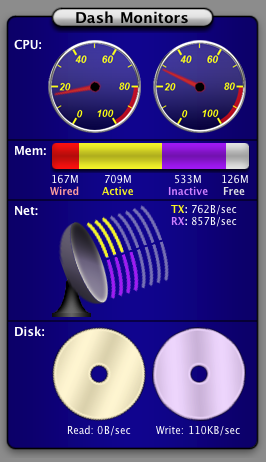
Well, a couple of weeks ago I finally decided to buy another gig of RAM, and it sure has made a big difference. I don’t feel nearly as crunched for space, and I don’t have to go through every so often and quit apps that I haven’t used in awhile. The thing is, if you have the RAM, you’ll use it. I found that out pretty quickly when I glanced at Dash Monitors after a day of working and noticed that most of my RAM was being used. Here’s a screenshot:
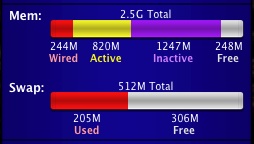
You’ll notice this screenshot also shows a new stat that Dash Monitors can monitor: Swap space. I’ve had a lot of requests for this feature, and I finally got around to implementing it. A lot of people just wanted to know how large the swap files were (by looking in /var/vm), but I felt that didn’t really show how much swap the computer was actually using, especially when you start using so much swap that each swap file is 1G or more. You might have a 1G swap file but only be using 50M of it, that makes a big difference. I found that by running sysctl, you can get some good virtual memory stats:


[Quiksilver:~] mike% sysctl -a vm
vm.loadavg: 0.26 0.25 0.25
vm.swapusage: total = 512.00M used = 205.92M free = 306.08M

Then it was just a matter of interfacing with sysctl APIs directly from MTK and the widget plugin. Works great, and I think it will be a good addition to Dash Monitors 1.4 when it is released.

Anyway, I think this will hold me off for a good amount of time. I still have 2 free DIMM slots, so I can always go for 1 or 2 more gigs, but by that time this machine will probably be getting close to the end of it’s life span. In the mean time, I’m happy and definitely enjoying the extra RAM.
Seasonality 1.1 Preview Images

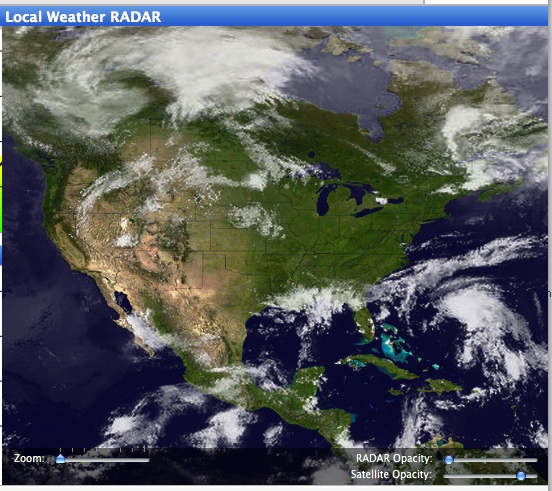
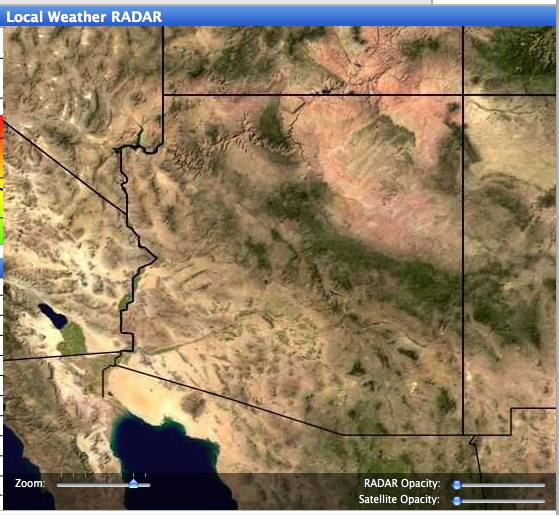
Seasonality 1.1 is coming along pretty well, and I thought I would take this opportunity to show everyone one of the biggest changes: the satellite/radar view. Seasonality 1.1 will allow users to browse the whole earth in the image view, not just a location’s surrounding area. This has been a lot of work, but I think the results are an order of magnitude nicer than the last implementation. Here are some sample screenshots. You can click on any of these to see the full sized image.


That’s right, you can zoom waaay out now to see the big picture. Satellite cloud overlays are available world-wide.

In this picture of Arizona with the cloud mapping turned off you can see the much-improved terrain resolution. The new terrain has 4x the res of Seasonality 1.0’s terrain, and if you took a full res image of the earth you would have 21600 x 10800 pixels.

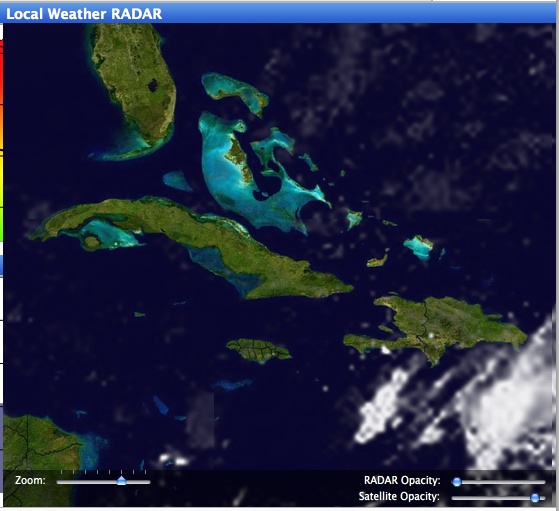
Another shot, this time of the Caribbean to show the cloud resolution. It is much lower than the terrain resolution, but with bi-cubic scaling it isn’t as rough around the edges.

I would love to get this release out the door ASAP, but there is still a lot of work that needs to be done for international location support. I finally found a source for global weather forecasts, so I’m pretty happy about that. At this point, I’m thinking it will be ready in September, but no guarantees. 🙂

macCompanion Review

Dash Monitors reviewed by Derek Meier at macCompanion…


“While not being free like most widgets, Dash Monitors is well designed, laid out nicely and is customizable. It is one of very few useful widgets that I find myself going back to time and time again.”

MTK is Ready

In preparation for a Dash Monitors 1.2 release tomorrow, I’ve released MTK 1.0 this afternoon. Dash Monitors 1.2 will get all of it’s statistics from the MTK app and plugins, and so far it’s working great on my machine here.

I’m hoping to get some developer docs written soon, so people can write their own MTK plugins. In the meantime, all the current plugins are pretty simply laid out, so you can probably just look at any of those to pick up how a plugin should work.

If you want to use MTK Plugins in your own project, check out the source code for the mtk command line executable. The MTKController class is a pretty good place to start, and the entire class isn’t much more than 150 lines of code.

MTK is released under the GPL, so please respect the open source nature of the code. The archive includes a complete copy of the license. Basically, it boils down to free usage as long as your code is released under the GPL as well.

Dash Monitors 1.2 Progress

I’ve been spending some time working on Dash Monitors 1.2. I changed the interface to make the widget smaller than the current version and polished it’s look a bit. I’ve also been spending some time optimizing redraw time. Dash Monitors 1.1 uses canvases to draw most of the monitors with Quartz-type routines. It ends up that doing more complex drawing with images in canvases is incredibly slow, and I hope Apple optimizes this area of the Dashboard code sometime in the future. Now I do more work outside of canvases and I’ve decreased the resource usage by around 30% so far. Screenshot below…

Tiger and Dash Monitors

Tiger is finally out, and today been great for Dash Monitors. Dash Monitors has been featured on multiple sites, and it’s currently ranked #2 in the top 10 Widget downloads on Apple’s download site (ahead of Delicious Library Mini Shelf, woohoo!). The downloads for Dash Monitors today have completely trumped any other release of XRG or Seasonality (on average, one download every 10 seconds since midnight), so it looks like the product will be a hit.

The thing is, Dash Monitors 1.1 is still a preview release. I wish I would have finished 1.2 before today, but I haven’t. It’s going to be a pretty big priority to get that taken care of though. I’m working on some new images to improve the look of the widget a bit, and I’m trying to condense things down so it doesn’t take so much screen real-estate. We’ll see how it goes.

If you are one of the people who has downloaded Dash Monitors, thanks for making the release a great success.

Gaucho Web Redesign

Well, the latest Gaucho Software website design has been posted. I think it looks a lot better than the old site…definitely worth all the effort.

Gaucho Software Website

Seasonality 1.0.1 is nearing release. It’s mostly a bunch of bug fixes, but there are a couple of new interface changes. The big interface change is with the graph view. Previously that interface was all coded in OpenGL (back when Seasonality was going to be a screensaver and not a full application). However, some users started reporting problems where text wasn’t being displayed in the view (on machines with less than 16Mb of VRAM, I’m thinking it was running out of texture memory or something), so I decided to rewrite it in Quartz. It ended up making the graph look a lot nicer too because anti-aliasing is built-in (I never did get it working correctly in OpenGL), and it should be easier to maintain in the future. Anyway, look for a release sometime near the end of this week or early next week.

Gaucho Software Logo

This weekend, I spent most of my time designing a logo for Gaucho Software and updating the web site template. The web site hasn’t been finished yet, but I thought I would post an image of the new logo. It took maybe 6-8 hours to create and I’m pretty pleased with the results.

Look for an updated web site sometime in the next day or two. I’ll post it here when it’s ready.

« Older posts Newer posts »

© 2026 *Coder Blog

Theme by Anders NorenUp ↑