Life, Technology, and Meteorology

Category: Gaucho Software (Page 4 of 8)

Mac360 Reviews Seasonality

I’m a bit behind on this one, but a few weeks ago Jack Miller over at Mac360 reviewed Seasonality

It’s one thing to know if it’s sunny or cloudy, cool or cold, warm or hot. Many Mac utilities give you quick access to the weather.

Seasonality becomes your weather center. It does everything but control the weather.

the Bleat

James Lileks of the Star-Tribune in the twin cities writes:

I have a new program that displays weather information from a variety of cities – such things are plentiful, I know, but this one suits my needs. It’s set up to tell me how things are in Mpls, Fargo, NYC, Scottsdale, and Glockamorra. Right now it’s 96 degrees in Scottsdale. At eight PM.

Sometimes I miss Arizona weather… The warm nights were wonderful. Want to go for a walk or bike ride in the evening? No problem, just walk outside. Don’t bother with a jacket (or even long sleeves). Of course monsoon season is incredible as well.

Seasonality 1.4b1 Public Beta

With the lack of forecasts available in Seasonality 1.3.x, I decided to release a public beta of Seasonality 1.4. This way, international users can get a forecast back as soon as possible. There are a couple of other key features that are available with this update. One is the new moon phase/moonrise/moonset functionality that I talked about in an earlier post. The second is the ability to add custom locations in Seasonality. Since Seasonality no longer depends on the limited number of locations for which Environment Canada provided forecasts, the app can now display weather data for any location. The interface for this is still fairly basic in the beta, but it will be improved before the final release. Another feature in the pipeline for Seasonality 1.4 is the ability to edit locations. Right now you can check out the Location Info Panel (via the Window menu) to show the configuration of your current location. The plan is to make those fields editable in the near future.

This is the first public beta I’ve ever released. I was a little bit nervous putting out a beta release publicly, but so far it’s been going pretty well. There haven’t been any bug reports yet, which is great. I’m guessing there has to be at least one or two minor bugs in there somewhere, but it’s comforting that no-one has noticed anything yet.

Rio Benchmarks

After installing the new Athlon X2 4600+ processor in Rio, I have to say I’m very impressed with the performance gains. Not only was I able to re-install Kubuntu server and get all the necessary packages installed again quickly, but the overall responsiveness of the machine is greatly improved while multitasking. This is especially noticeable with running 2 virtual servers using VMware Server.

So what about the benchmarks? I decided to start with the svnmark that Luis introduced on his blog, and downloaded Subversion 1.3.0 (1.3.2 is available, but the last benchmarks I did previously used 1.3.0). After a couple of runs, I found make -j4 to be the quickest. Here are the numbers:

Mac Pro Quad 3Ghz: 0:53
Dual Core Athlon 64 2.4Ghz: 1:27
Quad 2.5Ghz G5: 1:39
MacBook Pro Dual 1.83Ghz: 2:11
Dual 2.5Ghz G5: 2:35
Single Core Athlon 64 2Ghz (same server before upgrade): 2:59

After running this test and seeing the Athlon X2 compile faster than even a Quad G5, I’m pretty happy. Granted, the OS is Linux and not Mac OS X, but I doubt Linux would be that much more efficient when compiling software using gcc.

So how does it stack up with the forecast processing I need the server to do? Well in this case, I don’t have any solid benchmarks, I’m just running off memory here. The old processor was able to generate and serve a forecast in 0.4 seconds, where the new one can do the same request just under 0.3 seconds–a pretty solid 25% performance gain. This is all sequential code, so this doesn’t take into account the availability of a second processor. The forecast update is also a lot quicker, and with a second core the machine should still be able to handle connections from Seasonality to generate forecasts while updating the forecast database back-end.

Super Typhoon Ioke

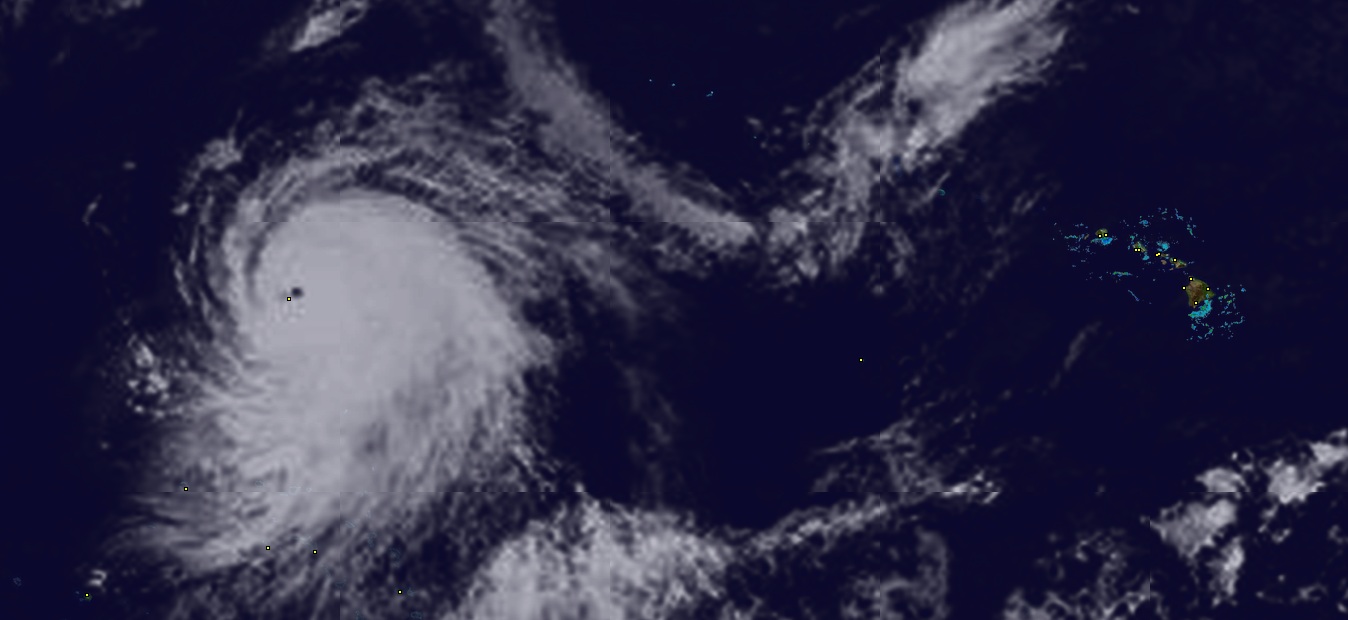
Check out this incredible satellite image taken from Seasonality of Super Typhoon Ioke. Ioke is the strongest typhoon in recorded history to form in the central Pacific Ocean, with sustained winds of 160 mph and gusts up to 185 mph. That yellow dot in the middle of the storm is Wake Island, a territory of the U.S. The storm surge was supposedly going to completely engulf the island, so all 200 people who live there were evacuated and flown out to Hawaii.

It’s rare to see such a large storm with a organized center “eye” like this. Click on the image to get a larger view that shows a reference of where this is taking place. If you are wondering if Hawaii is at risk, don’t, because the storm is heading in the opposite direction. It is projected to weaken to the equivalent of a category 3 hurricane by next Tuesday, still in the middle of the Pacific.

Rio Upgrade

With the additional resource requirement I wrote about a couple of weeks ago, I ended up deciding it was time to upgrade the server here (Rio) with some additional CPU hardware. When building Rio late last year, I wanted to make sure the hardware was fairly upgradable. The easy choice at the time was to go with Athlon 64 processors, since I could start with a pretty basic 2Ghz single core chip, and have the option to upgrade to a dual-core CPU later on. Well, that time is now, and today the new processor arrived. I ended up purchasing an Athlon 64 X2 4600+ processor, which boils down to a 2.4Ghz dual core CPU. Fortunately, with AMD’s price drop just a couple of months ago, I didn’t pay much more for this processor than I did for the original.

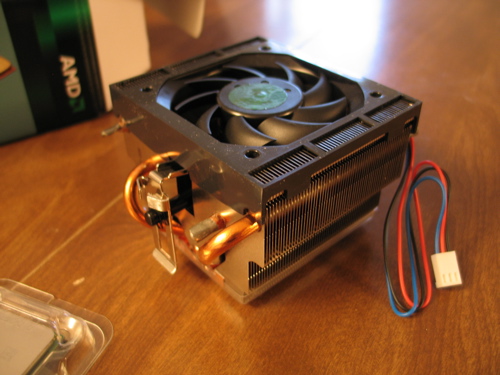
One thing I was a bit surprised with was the difference between the new and old heat-sinks. I wasn’t expecting much of a difference between retail CPUs in the same processor line-up, but the new one is of a much higher quality. Here’s a picture…

So now I have to do some real-world benchmarking to find out just how much faster this CPU will go. I suspect the database importing times will improve dramatically, and the server will be much more usable while the update is taking place with the additional core. I’ll probably post again here with some benchmarks when I’ve had a chance to try things out.

With most of the forecast back-end work complete, I’m hoping to release a public beta sometime later this week or maybe next week. I just need to finish tweaking performance for the new CPU and smooth out some database replication issues. It sure will be a relief to have this new forecast system online.

WWDC Keynote Thoughts

Between all the great sessions here at WWDC yesterday and Buzz’s excellent blogger party last night, I’ve had just about 0 time to blog about anything that has been announced here. The typical news sites have been posting all the details on Mac OS X Leopard that Steve talked about yesterday, but I thought I would add a couple of my own comments on Leopard.

First, though I’m under NDA for a lot of the content here, I’ll just say that Leopard adds a lot of nice features for developers. I would not be surprised to see a lot of applications next year requiring Leopard. I’m sure some Tiger/Panther users will feel a bit left out, but the development time can be collapsed greatly, and these apps will be a lot more polished.

64 bit is a big buzzword around here. It is a big deal…even with 64 bit POSIX available at the UNIX layer in Tiger. That was nice, but it meant that only command-line applications that used straight POSIX libraries would have the ability to run 64 bit. As was mentioned in the keynote, Apple has extended 64 bit support all the way up to the Cocoa and Carbon layers…completing the transition to 64 bit for Mac users. I think this will allow some very high-end scientific applications to provide absolutely beautiful visualization displays without having to write a bunch of extra code to handle 64 bit data processing in a different process on the back-end. I haven’t tried building Seasonality for 64 bit yet, but I suspect that it will provide a slight speed improvement on 64 bit machines because the satellite image is highly accelerated in hardware using the Accelerate framework. 64 bit processors may be able to generate a new satellite image up to twice as fast. I’ll update my blog with performance results on this sometime in the future.

Mail.app changes seem to be aplenty. I haven’t loaded the Leopard preview on my MacBook Pro yet to see just how much has been improved, but already I’m impressed. The templates look to be a good idea, but I can’t see myself using them too often. I’m sure there will be a subset of Mac users that will get a kick out of that though. The notes feature strikes me as a big chunk of bloatware tacked on to Mail. If you need to take notes, there should be another place to do it outside of your inbox. Sure, people spend a lot of time in Mail, and I’m sure a lot of people take notes while reading/responding to email, but that doesn’t mean that notes should be an integrated feature. It seems that a much better solution to write a new system-wide notes application that would let you bring up an interface with a hotkey, type something in, and dismiss it.

Apple still hasn’t updated the Finder. I really hope this is one of the “top secret” features they aren’t releasing until the end. The Finder is something Mac users spend a lot of time using, and the amount of legacy code still in there is pretty staggering. At the very least, the Finder needs to use more threading, but really they should start from scratch and try to implement something that is more efficient. They should also revisit usability. When using the Finder with a modern system with several hundred thousand files, it takes awhile to navigate to where you want to be (Note: this applies to all the current file-system-exploring applications I’ve used on any platform). Spotlight improves this situation somewhat, but it is still a pretty big problem and will only get worse as hard drive capacities skyrocket as they have been in recent years.

Despite these drawbacks, Leopard as a whole is a big improvement. Time Machine and Spaces are greatly welcomed, Core Animation will be a huge win for the usability of Leopard applications and the iChat improvements seem pretty solid.

Weather Computing Resources

One thing I wasn’t expecting when entering the world of weather software with Seasonality was the sheer amount of computing resources that weather data and processing requires. You hear about the supercomputers that different government organizations purchase for weather forecasting and research, but I never really gave a second thought to it. I just assumed that those computers were running high-end computations in a completely different league than the typical online weather service. This is true to some extent, but I severely underestimated how many resources an online weather service can use itself.

Take for example the fairly simple idea of recording temperatures, wind speeds, pressure, and other conditions for locations worldwide. One commonly used system in place for this is a network of 4,000-5,000 different ICAO stations around the globe. This network of weather stations is the same used to generate weather graphs in Seasonality. Most ICAO stations are located at airports or military bases, but some of them are at other public facilities. Each of these stations will report their conditions, on average, maybe once an hour. Now that’s a lot of data for one day, but it seems pretty manageable. However, what if the idea comes up to store this information for a long period of time, say to allow Seasonality users to download several months of data to populate their graphs when using Seasonality for the first time. This raises the required resources to a whole new level. I’ve been collecting data from these weather stations for the past 9 months or so. Every month, about 4.5 million new data records are added to the PostgreSQL database I set up to keep track of this data. By now, the database is several gigabytes. The problem comes when trying to access this data at a later point in time. Even singling out a single ICAO weather station for one month of data can take 30 seconds to query. And this is on a 2Ghz Athlon 64 system with 3GB of RAM and a RAID storage system. What happens when thousands of users are hitting this database at the same time? Literally nothing, the database would be denying more requests than it could fulfill. I’ll continue to work on this functionality, and hope to find a good way to manage this load in the future.

A more recent example presented itself a little over a week ago when Environment Canada ceased to provide forecasts for international weather locations. Seasonality depended on that data to display forecasts outside the U.S., so right now a big hit is taken for users depending on Seasonality to provide that data. So I attempted to find a new data source for Seasonality to use. Prepared worldwide forecasts are hard to come by, but I have found a suitable replacement for this data in a more raw format. The source I found provides GRIB files containing the gridded output from the GFS (Global Forecast System) model. This is really good data, providing more than 50 different variables (temperature, wind speed, wind direction, pressure, cloud cover, among many others) across several different layers of the atmosphere (from the surface to 1 millibar). The grid resolution is pretty good as well, down to 0.5 latitude x 0.5 longitude blocks.

With all this data I can generate a forecast for any location around the globe with reasonable accuracy, but it comes at a cost. The data is plentiful, and it takes plenty of space. The model produces a forecast every 3 hours out to 180 hours (7.5 days) into the future. That’s 60 data sets total. Each data set is around 26MB to download, 1.5GB for a complete forecast. This is just a massive amount of data, especially when a new forecast is generated 4 times a day.

Fortunately, there is a way to pick and choose which variables and which atmospheric levels you would like to download. At the moment, I’ve narrowed down the data set I would require to about 200MB per forecast. Great, that’s doable…I adapted some Perl code I found with a free license on the internet to fit my needs, and I have a cron job going to download the data I want. Depending on the server speed, the download takes an hour or two.

Next, I need to convert the data from the GRIB binary format into something I can throw into the PostgreSQL database. The database should have a row for each block in the longitude/latitude grid, for each 3-hour time period the forecast is generated. With 0.5 longitude/latitude resolution, that’s just under 260k rows in the database for every 3 hour data set, or 15.5 million rows for the entire forecast. My Athlon server takes about 2 hours to parse all the GRIB files and throw them into the database, and this is after extensive optimization on my part.

The data doesn’t do any good if I can’t get to it easily. I need to index the data to help speed up querying. It makes sense to set up indexes based on the longitude and latitude, since this is how I will be querying the data. The indexes I’ve got so far take about 30 minutes to an hour to generate.

When all is said and done, it takes around 4-5 hours to get the forecast back-end ready for Seasonality to query. The data source I’m hitting provides new forecasts every 6 hours, so it really doesn’t make sense for me to refresh that often when it takes so much time to process the data. Maybe updating once or twice a day will be reasonable in the end.

So what about query speed when Seasonality users want to grab a forecast from the server? I think it’s fair for a query to take about 5 seconds to return data…and right now that looks to be doable with my current hardware. With adequate caching, I can probably drop the response time for frequently-used locations even lower. Then there’s redundancy to think about. I want to make sure if something wonky happens with my server or network connection, that there will be a backup somewhere else. I can’t put the CPU load required for parsing the data onto my hosting provider’s servers, but I can use their bandwidth after the data is in a format that can be queried. I’m hoping to replicate the data after it’s been processed and throw it on the hosting server.

All of this for the seemingly simple feature of a forecast. There’s still a lot of work I need to do before this new forecast will be ready, but in the end I think it will be worth it. Seasonality will no longer have a dependency on another weather outfit for forecast data. The GRIB data format is a standard, so it’s easy to add redundant sources for this data. I will also be able to update the code to provide more accurate forecasts without having to release a Seasonality update, because that is all server-side. Initial forecasts will be fairly simple, but I expect that over time I’ll be able to improve forecast detail and accuracy by making use of more data variables.
Seasonality 1.4 Preview: The Moon

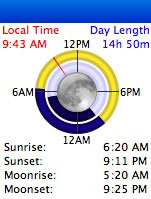
I’ve been working on Seasonality 1.4 and thought I would show a quick preview of the new moon-related features. The screenshot here shows the new sun/moon view in Seasonality. The look of this will probably change before 1.4 is released, but I think it’s looking pretty good so far.

Last week I got some code working to calculate the moonrise and moonset times, so those are now displayed in text along with the sunrise and sunset times. I also added a new moon ring within the sun ring to give a more graphical representation of what the moon is doing at any given moment. This ring also provides a pretty slick view for astronomers, who often do not want the moon to be out while viewing extraterrestrial bodies. Since the moon ring and sun ring time periods match, it’s easy to see when both the sun and moon will be out of the picture. In this screenshot, the sun and moon match up pretty closely, but that’s not always the case.

I couldn’t add moonrise and moonset without adding a moon phase display, so that’s coming in Seasonality 1.4 as well. In the center of the rings, the moon will be graphically drawn with the appropriate amount shaded. It’s accurate within 0.7% of the actual moon phase over the next 5+ years. One interesting thing I learned while adding the moon phase is that the synodic month (the amount of time between one new moon and the next) is gradually getting longer. This is caused by the moon moving further from the earth, at a rate of about 3.8 centimeters per year. Just another random tidbit of knowledge gained while working on Seasonality.

« Older posts Newer posts »

© 2026 *Coder Blog

Theme by Anders NorenUp ↑