Life, Technology, and Meteorology

Category: Gaucho Software (Page 3 of 8)

A Weather Developer's Journey Begins!

A few months ago an idea came to me for a new domain name I should pick up. I wasn’t sure what I was going to do with the domain yet, or if I would even use it at all, but I wanted to jump on it because it was available. It struck me as a good name, and I was a bit surprised that it was still available.

Zoom forward to a couple of weeks ago, when a different idea for a new website came to mind. Oftentimes I post detailed entries here specifically about the weather or very weather-tech related articles when I run into issues while developing Seasonality. The thing is, I’m not sure my typical reader is interested in these postings, and occasionally I will refrain from posting about weather-related issues simply because I don’t think it would fit well in the *Coder blog.

But wait a second…I bought that domain awhile back, maybe that would work. Actually, it ended up being perfect for my new site idea. So I started working on it off and on. I’ve been happily using WordPress to host this blog for quite some time, so I decided to use the same platform for the new site. I set things up, customized a theme, and wrote a posting or two. I think now it is finally ready to be revealed, and I wanted to share. The domain is weatherdeveloper.com, and the site is called “A Weather Developer’s Journey.” With the full-time development of Seasonality 2 coming soon here, I thought it would be a perfect time to start a site like this, as I’ll be spending a lot of time trying to overcome issues with data hosting, manipulation, and weather visualization.

If you’re at all interested in checking it out, please do so (Website, RSS Feed). I’ll most likely post links from here to the first few articles on the new site, just to get the ball rolling. The first article talks about finding and putting to use 90 meter elevation data.

Summer Update

It’s been almost two months since I’ve posted here, so to avoid the risk of this blog becoming a dinosaur, I thought I would post an update.

Katrina and I returned from our 6-7 week road trip in the beginning of July. We drove out to California at the end of May, and stayed with family for several weeks (also hitting WWDC, of course). On the way out there, we took the northern route, hitting Mt. Rushmore, Yellowstone, the Tetons, and the Salt Flats. On the way back, we started in Santa Monica and drove Route 66 all the way through St. Louis, taking the freeway the rest of the way home after running out of time. We’ll have to drive the rest of Route 66 from St. Louis to Chicago sometime soon. Overall, it was quite a trip. Watch my Flickr stream for photos of the trip.

Been working on finishing up DynDNS Updater 2.0, which will hopefully be ready soon. The app is looking pretty good. A lot of smaller details have been improved upon since beta 5, that collectively improve the application quite a bit.

Trying to spend some time working on Seasonality’s international forecast as well. I’ll post more on this at a later point in time, but I’ve created some cool imagery and animations that I’ll be using to tweak the forecast generator to make it more accurate.

C4 is coming up this weekend! I’ll be taking off for Chicago tomorrow for a weekend of Indie fun. I’ll be showing an entry for the Iron Coder Live contest…which reminds me I still need to fix a bug or two there. Should be a blast. I’ll most likely be keeping my Twitter feed up to date more than posting here about stuff.

Speaking of Twitter, I started Twittering (is that a word?) a few months ago, and I’m hooked. If you don’t know, Twitter is a place to post Tweets, which are short bits of text (no longer than 160 characters), usually telling others what you’re up to. My first thought was how much time I would be wasting by doing this, but the whole idea is that posting a Tweet is supposed to be really quick. It provides some nice breaks throughout the day, and the community building around the site is pretty amazing. Check out my Twitter page, and if you’re interested, sign up and start using Twitter yourself.

That’s all folks…

DynDNS Updater 2.0 Public Beta

This just went live in the last 24 hours. Along with working on my own Gaucho Software products such as Seasonality, Dash Monitors, and XRG, I also consult for other firms. I’ve been working with Jeremy and the rest of the DynDNS team on their Mac update client for quite some time. Just recently, version 2.0 of the project has reached a stage where it’s ready for public beta consumption. The interface, developed by FJ de Kermadec and his team at Webstellung is top notch, and does a great job hiding the complexity of everything going on behind the scenes. We still have some work yet to do before a final 2.0 release is ready, but I think the app is looking pretty good thus far.

If you use DynDNS services, check it out. If you aren’t using DynDNS services, give their website a look-see to determine if you should be using their services. 🙂

Server Colocation

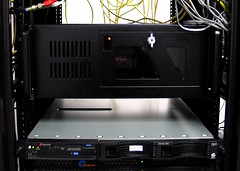
I’m happy to say that after spending the past 5 months in the pipeline, Rio (the Gaucho Software Forecast Server) has now been moved to a colocation facility. The facility provides redundant power, cooling, and several connections to Tier 1 network providers, which should definitely increase the server’s overall reliability. Previously, this server was located at my office. I had it hooked up to a UPS battery backup that gave it about 30 minutes of runtime, but it’s a far cry from true redundant power. Also, over the past several months, it seems that my business network connection reliability has been slowly decreasing. This should fix that issue.

Rio in the rack...

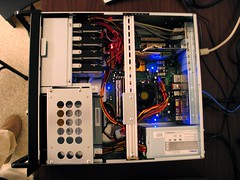
Before moving the server, I thought it would be a good idea to add a bit more memory and hard drive space to the box. I bumped up the memory to the motherboard’s max of 4Gb, which gives some more breathing room for the virtual machines I’m running via VMware. I also added another 300GB hard drive and switched from a 3 disk RAID 5 configuration to a 4 disk RAID 10. I had been reading on PostgreSQL mailing lists that for configurations with less than 6-8 hard drives, RAID 10 was substantially faster than RAID 5. RAID 5 has always been infamously slow at writes, but the read speeds are pretty good in general, so I had my doubts. Well, my doubts were definitely unfounded, because this single hard drive upgrade has given a dramatic performance increase. Previously, when running the forecast generator (twice a day), the processing would take approximately 2 hours. Now, after adding the 4th disk and switching to RAID 10 using an XFS filesystem (more on this below), the same process takes only 1 hour and 10 minutes.

Rio inside...

Since I was starting with a fresh RAID partition, I thought I should put some time into looking at different Linux filesystems. I used Bonnie++ to perform the disk benchmarks using a temp file size of 16GB. Initially with a standard Ext3 filesystem:

Version  1.03       ------Sequential Output------ --Sequential Input- --Random-
                    -Per Chr- --Block-- -Rewrite- -Per Chr- --Block-- --Seeks--
Machine        Size K/sec %CP K/sec %CP K/sec %CP K/sec %CP K/sec %CP  /sec %CP
rio.gauchoso 16000M 50719  83 103617  41 43095  10 51984  76 117808  13 285.4   1
                    ------Sequential Create------ --------Random Create--------
                    -Create-- --Read--- -Delete-- -Create-- --Read--- -Delete--
              files  /sec %CP  /sec %CP  /sec %CP  /sec %CP  /sec %CP  /sec %CP
                 16  2730  98 +++++ +++ +++++ +++  3024  99 +++++ +++  9129  99

Not bad…just over 100MB/sec writes and 117MB/sec reads. Notice the random seeks/sec value of 285.4/sec and file creates of 2730/sec. On a database system, the disk heads are given quite a workout, reading from indexes and data tables all over the disk. So seeks/sec performance was important to me. Memory cache helps, but my database is around 30GB on disk, so caching only goes so far. Overall, the ext3 numbers sounded pretty good, but I didn’t have anything to really compare them to.

I decided to try out SGI’s XFS filesystem. After seeing several benchmarks online between filesystems like ReiserFS, JFS, Ext3, and XFS, it seemed that XFS almost always had the best performance in general, so I gave it a go. XFS has a lot of nice features, including tools to defragment a partition while the system is active, the use of B+ trees for volume indexes (resulting in a much greater efficiency when you have a ton of files in a single directory), and a pretty decent tool to repair broken filesystems as well. I reformatted the partition and ran Bonnie++ again with these results:

Version  1.03       ------Sequential Output------ --Sequential Input- --Random-
                    -Per Chr- --Block-- -Rewrite- -Per Chr- --Block-- --Seeks--
Machine        Size K/sec %CP K/sec %CP K/sec %CP K/sec %CP K/sec %CP  /sec %CP
rio.gauchoso 16000M 55354  79 126942  21 32567   6 47537  70 126927  14 415.8   1
                    ------Sequential Create------ --------Random Create--------
                    -Create-- --Read--- -Delete-- -Create-- --Read--- -Delete--
              files  /sec %CP  /sec %CP  /sec %CP  /sec %CP  /sec %CP  /sec %CP
                 16  3917   2 +++++ +++  2662   3  3102   5 +++++ +++  2612   3

Write speed increased a healthy 22% to almost 127MB/sec, and read speed increased almost 8% to a similar 127MB/sec rate. But look closer at the seeks/sec and creates/sec rates… Seeks/sec increased an incredible 45% to 415.8/sec, and file creates improved 43% to 3917/sec. The drawback? Deleting files is quite a bit slower, 71% slower to be exact. To me, this tradeoff was well worth the gains, as it’s fairly rare for me to be deleting lots of files on the server. I have noticed a slight performance degradation while using rm with a lot of files, but it’s still a RAID so performance is certainly acceptable.

It’s not good to use just a single benchmarking tool, so I checked the validity of a couple of Bonnie++’s claims with a few simple dd commands, this time using 8GB file sizes:

root@rio:/rio# dd if=/dev/zero of=/rio/bench bs=8192 count=1000000
1000000+0 records in
1000000+0 records out
8192000000 bytes (8.2 GB) copied, 63.7116 seconds, 129 MB/s
root@rio:/rio# dd if=/rio/bench of=/dev/null bs=8192 count=1000000
1000000+0 records in
1000000+0 records out
8192000000 bytes (8.2 GB) copied, 59.2728 seconds, 138 MB/s

Those match up pretty well on the writes, and reading from the disk sequentially with dd is even faster than Bonnie++ claims.

Overall, I’m pretty pleased with the upgrade. I’m even happier to have this server at a datacenter. This should give me a lot of room to grow with hosting more weather data for upcoming Seasonality features, and also gives me a good server to run some other services on as well.

Happy Birthday Seasonality!

Seasonality is two years old today. Sometimes when I look back on progress made as several releases have past, it can be surprising just how much it has changed. I thought this might be a good time to revisit Seasonality’s development path and maybe talk about where Seasonality is going from here. This is a long posting, so go grab one of your favorite beverages, kick back, and enjoy the ride.

Most people find it surprising that the idea for Seasonality didn’t start as an application at all, but instead as a screensaver. The screensaver wasn’t even going to focus on the weather. I wanted to design something to show weather, news, stock info, and other information. I called it gKiosk. The g came from Gaucho Software (I thought I would produce a g-line of products instead of the i-line that Apple chose), and Kiosk was the best term I could think of to describe all this information together. Since I already had some code from XRG to generate weather graphs, I started porting that first and working on the weather section. After a few weeks of working on the project, I began to realize just how involved it would be to even produce just the weather section of gKiosk.

I’ve always had a casual interest in the weather. I can remember being stoked after getting a cheap plastic weather station kit when I was a kid. The instruments were useless for taking accurate measurements, but they were fun to play with. My childhood interest in meteorology didn’t develop much past that, but a general curiosity remained. With this casual interest, and some half-written code I decided to cut the news and stock portions out of the project and chose to develop a dedicated weather screensaver.

Shortly thereafter, I came to another fork in the road. I wanted to develop a product that was going to sell, after all I was working on Gaucho Software full time, and without sales I was without an income. Users will buy programs they find useful, but no-one really “uses” a screensaver. Screensavers start when a user walks away from their computer, and as soon as they return, the screensaver is brushed aside so some real work can be accomplished. I didn’t want to develop a program that would be brushed aside, so at this point, I took the screensaver view I had worked on and shoehorned it into an NSWindow. Gaucho Software’s first new program was going to be a weather application, and it was going to be called Seasonality.

Three to four months later I had a basic concept working. I wanted to get some feedback from friends at this point to see if I was on the right track, so on February 7, 2005 I sent an email out with a Seasonality 0.1 release. Here’s part of that email:

Well, it's time to release version 0.1 of another product. This is the first pre-release version of a new weather application called Seasonality. I've been working on this application on and off for the past 6 months, resulting in just over 10k lines of code (almost as many as XRG with over 2.5 years of off-hours development time). This is probably already assumed, but please don't pass this link along to other people. If you know of someone else who you think would be interested in testing out this app, let me know.

The purpose of this release is to get some feedback from a select group of people about the design and implementation of the application itself, and I would appreciate any feedback you could give me. Questions to think about: Does the app have the basic features that you would be looking for in a weather application? Does the work-flow of the app make sense (method of adding and removing locations, changing the display, prefs, etc)? Is there anything that blatantly stands out to you as not making sense in the design? Is there anything missing (besides the obvious lack of international support)? :-) Basically, I'm looking for a sanity check before adding the final features and start beta testing for a public release.

Feedback at this stage was highly beneficial, just to make sure I was on the right track while finishing development. Here’s a screenshot from just before that release that I’ve never posted before. The interface was pretty embarrassing looking back on it, but I was able to clean it up before 1.0. 🙂
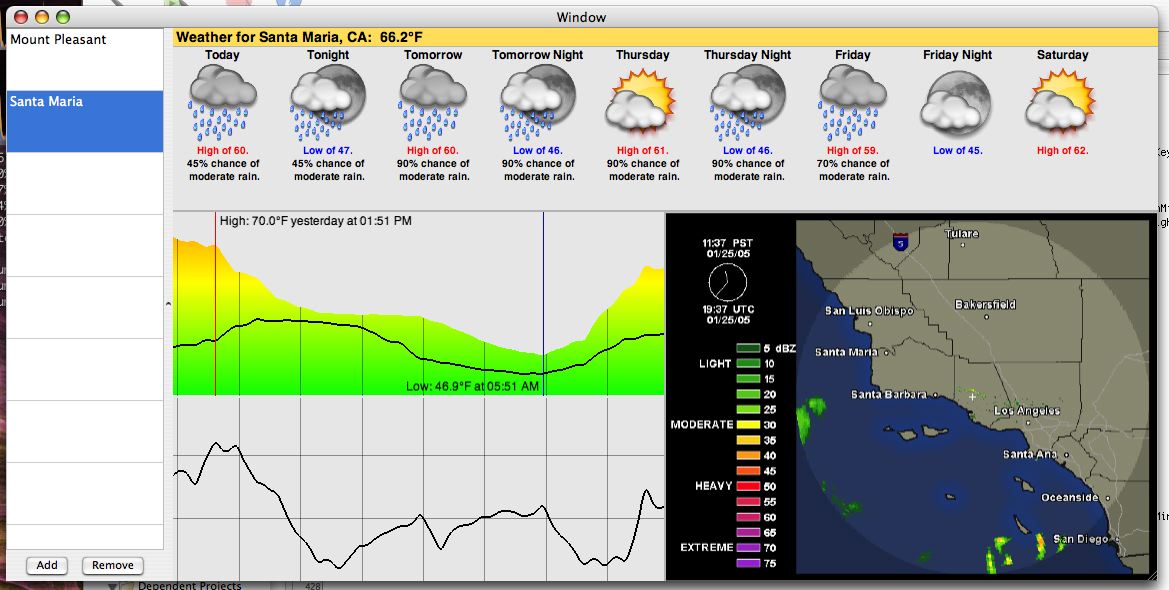

Pre-Seasonality 0.1

While the general layout is the same, I can’t really recognize any part of this window in the current release. Fortunately, it seemed that even though the application was very rough around the edges, the concept was good; it just needed polish, a lot of polish. One thing that I’m sure many users are thankful for though is the color theme switching from a “sunny” yellow to a blue, which looks a whole lot nicer next to other OS X applications.

A lot changed in the 6 weeks after that. I re-worked the forecast to a more compact display with a stacked day/night view, informational text was added in the location table (along with a slicker interface for adding/removing locations), radar images turned into something that I actually generated instead of displaying an image off a website, and graphs actually became something that could be customized a bit. The 1.0 beta was pretty intense, and fortunately Katrina was putting in long hours at the office so I could do the same.

I don’t remember much about March 21st, 2005, but I do remember not sleeping much the night before. It wasn’t that I was cramming all the last minute stuff in, it was more of an anxiety I had. What if it didn’t work on other Macs? What if the web server went offline? What if the licensing didn’t work? What if no one bought it? Luckily, it did work on other Macs, the web server was fine, licensing worked (except for a small detail–I left a serial number in a textbox in the nib file…didn’t take me long to fix that one :-)), and people did buy it. Overall, it was a pretty good release. I posted a preview a few days before release here on my blog. Here’s a screenshot of Seasonality 1.0 in action…
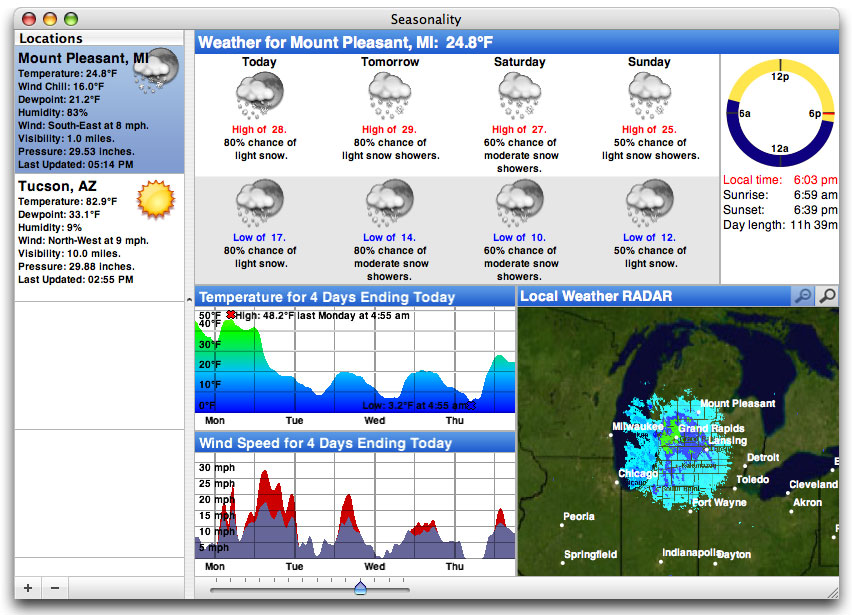

Seasonality 1.0

Naturally, like the 1.0 release of any piece of Mac software, the support and feature requests started pouring in. It was great to hear from everyone who was giving Seasonality a try, and a lot of feature ideas I received at this time have made it into later versions (and some are still on the list of features I’m working on!). At the time there were several ideas I had for future releases, the most notable feature absence was mentioned in the email I sent out for 0.1 above: Seasonality didn’t support international locations. So I went back to cranking out code and 7 months later I emerged with Seasonality 1.1.


Seasonality 1.1

Seasonality 1.1 had a real interactive satellite map…you could drag to navigate all over the world. The forecast changed to it’s current zigzag layout to make it easier to interpret, and the cylindrical wind direction graph was born. I still don’t think there’s any graph like it being used in other weather software, and I’m glad no one has copied the idea yet.

While there have been a lot of new features added since the Seasonality 1.1 release, my programming mode kind of switched at that point. The interface had settled down a bit, and the basic featureset was looking good. I started focusing on evolving the application and molding it into what I ultimately wanted version 1.0 to be. Seasonality 1.2 contained a lot of code cleanup, a ton of bug fixes, and some interface polish.

The polish and cleanup was a big change, but by far the biggest update in Seasonality 1.2 was French language support. I had wanted to support multiple languages for quite some time, but hadn’t a clue how to approach it. After going to WWDC that year and learning about OS X’s localization support, it didn’t look too difficult. Apple’s presentations at WWDC always seem to make things look easier than they are though. 🙂 I heavily underestimated the amount of work required. It took weeks, if not months, of trying to catch all of the different text phrases in the app. Not only did all the strings need a French equivalent, but spacing needed to be changed in cases where the French string was longer than the English one. Then came the help translation, which was an ordeal in and of itself with text encodings and other issues. Fortunately, Ronald and Philippe were dedicated as translators to getting everything done quickly. There were some days I couldn’t keep up with all the changes and updates they were sending over. In the end, I think users really appreciated the change, not only in France, but other French speaking countries such as Canada. Ever since, I’ve been using online translation websites fairly frequently to handle support requests.


Seasonality 1.2

Seasonality 1.3 looked a lot like Seasonality 1.2, with the exception of the new graph handling that allowed more than 2 graphs to be shown at one time. Journalling was the next big thing here. Seasonality finally had a 2nd window! Shortly after Seasonality 1.0 was released, I received a feature request from a gardener who wanted to keep track of and take notes of the current conditions. This was my first hint that Seasonality could be used for anything other than casual weather observation. Since then I’ve received emails from pilots, sailors, home automation specialists among other fields. It’s very satisfying when someone tells me they use Seasonality in a way I haven’t thought of.


Seasonality 1.3

Progress was going great, until August of 2006 when international support broke. Not just “broken” in the respect of being able to fix it with a couple hours of coding, but really broke. In an application dependent on web services, there’s always going to be times when an XML-RPC API will change, or maybe a web site’s layout will foul up your parser a bit. However, in this case Environment Canada pulled their international forecasts entirely. It had taken quite some time to find an international forecast source the first time around; it was even tougher to find a replacement. It took me a week or two just to find a new source, but that source was direct model output data, which is beyond any raw data I had ever worked with. This was the first time I couldn’t just display some weather data, I had to interpret what the model was predicting and programmatically generate forecasts, and then verify that the forecasts were close to what other weather providers were forecasting. It took me over a month just to write code to interpret the data and optimize the web server.

The silver lining to this cloud is the added flexibility I have from this point forward. In Seasonality 1.4 I was able to allow users to add their own custom locations because I was no longer limited to just the locations Environment Canada chose to forecast. A lot of other cool features such as wind forecasts will be coming out of this in the future. When I was finally able to recover and focus on Seasonality 1.4 development, I added moon information, which makes the sundial look a lot cooler, and a ton of bug fixes and code optimizations…


Seasonality 1.4

So where does that leave us? Today I’m happy to announce a new release, Seasonality 1.4.1. There were some remaining bugs in Seasonality 1.4 that just needed to be wrapped up. Especially since development of new features for Seasonality 1.x is nearing the end…

From this point on I’ll be working on Seasonality 2.0. I tagged Seasonality as “weather taken to the next level.” Now it’s time to explore the level after “next.” I’m not ready to announce any new features yet, but I can say the current list is looking pretty hot (no pun intended). I’ve been mulling over a fresh interface design in my head for the past several months–an interface design that will not only improve the display of data that Seasonality currently shows, but also make room for some really cool new feature ideas I have for Seasonality 2.1+ releases… If you’re thinking of buying Seasonality today, don’t hesitate. Seasonality 2.0 is still a ways off, and everyone who purchases Seasonality now will get a free upgrade to Seasonality 2.0.

If you’re still reading at this point, all I can say is “wow,” you have a lot of patience. 🙂 I’d like to send a thanks out to all the Seasonality users and beta testers… The past 2 years have been a blast and I can only hope for the same next year as well.
What is dewpoint?

I just posted a new weather article over on the Gaucho Software Forums this morning. The article talks about what dewpoint is and how we can measure it. This is one I’ve been meaning to write for quite awhile now and I finally got a chance to spend some time on it.

If you have any comments on the article, feel free to post them on that forum topic. I have a few ideas for future articles but I want to make sure I don’t run out of topics. If you have any suggestions of topics I should cover, get in touch with me.

The Cult of Seasonality

I’d like to send a big thanks out to Scott McGrath for his awesome review of Seasonality on the Maccast

Seasonality is a gorgeous OS X application, a distinctive Cocoa app that makes people stop, look and ask questions when they walk by a display showing its exotic weather maps, satellite imagery, forecast data, and charts of recent weather in your region.

Seasonality 1.4

I released Seasonality 1.4 out into the wild this morning. So far the release is going pretty nicely, without any major bugs found as of yet. I’ve been using the beta for the past few months without finding any major issues, so I kind of expected this to be a pretty stable release. The forecast server here has dished out over 700,000 forecasts up through yesterday (that’s without a final Seasonality release hitting it). I’m interested to see how long it will take to hit a million with this official release of version 1.4. Thanks go out to everyone who helped beta test this release.

Also, with the risk of writing about out-of-date news, I’ve posted a couple of weather articles over on the Gaucho Software Forums. First is an explanation for the fairly quiet Atlantic hurricane season this past year. I talk about some of the ingredients needed to form a hurricane, and what has been missing this year. The second article, posted last week, explains why why relative humidity is a bad measure of moisture in the atmosphere. If you’re interested in either of those topics, be sure to check out these articles. As a side note, I am patiently waiting for the next release of YaBB Forum software, which has RSS support so users will be able to subscribe to these weather articles I post. They have a feature-lock on the release, but no word yet on an expected release date.

Disk Image Details

Expectations are high when you release a piece of software for Mac OS X. Every part of the interface has to be top-notch, even the disk image which may only reside on the user’s computer for a time period of a few minutes while they install your app.

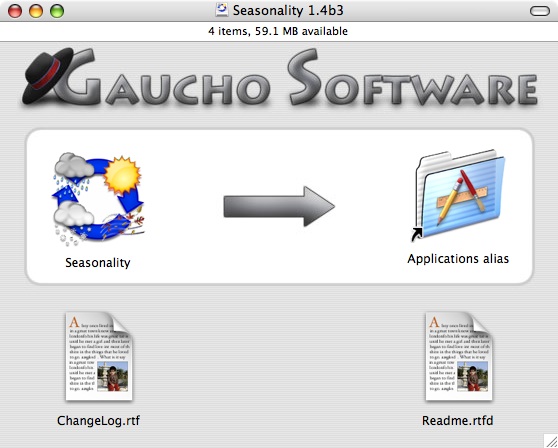
For Seasonality 1.4 I decided it was time to refresh the look of the disk image a bit. I had a custom background image previously, but it looked a lot like the Gaucho Software website, and I didn’t think that branding was appropriate for the DMG. A few months ago I came across a blog posting over at Software Trenches with some good comments regarding different DMG designs. There are some very nice background images displayed there, but the one that stood out to me was that of Adium. It was clean, easy to read, and matched the style of OS X pretty well. I decided to base the new Seasonality DMG off of that type of design. Here is what I came up with…

At the top I have the standard Gaucho Software text and logo, complete with drop shadows where appropriate. The background has some very faint pin-striping, just to add a bit of texture and depth. It’s also a tribute to older versions of Mac OS X. Below that you see a highlighted box, which draws the user’s attention to the immediate action that needs to be performed to install Seasonality. I spent some time working on the arrow, and decided to match it’s look with the text above. Finally, at the bottom you have a couple of supporting documents.

One nice thing about this DMG design is the icon spacing. It’s setup so the icons are at the default grid spacing of Mac OS X, so this will save me the trouble of lining up the icons exactly every time I create a DMG.

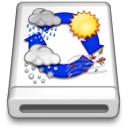
An aspect of a DMG archive that is commonly overlooked is the disk image icon. A lot of apps use the standard disk image icon. A small subset of apps will go one step further and place their application’s icon on top of the standard disk image, to make that particular DMG stand out more. What most developers overlook is keeping the 3 dimensional aspect in check. Just pasting the application icon on top of the disk image icon will result in the app icon that does not match the 3D perspective on the disk image. To fix this, I make a couple of Skew adjustments in Photoshop, and the disk image icon below shows the completed results. This makes the icon more believable and adds that final touch.

« Older posts Newer posts »

© 2026 *Coder Blog

Theme by Anders NorenUp ↑