Life, Technology, and Meteorology

Category: Macintosh (Page 3 of 6)

MacBook Pro Temperature Sensors

Just as an update of my MacBook Pro situation…I picked up a 2Ghz MacBook Pro at the Apple Store in Grand Rapids yesterday. So far, this model is an order of magnitude better than my last machine. Only a single noise problem still exists, and it is so much lower in volume that I don’t think it will be an issue at all. Furthermore, physically the machine feels like it’s built better. The trackpad button feels a lot nicer, and it takes more effort to move the screen on it’s hinge, which results in a much nicer feel. I’m a happy customer. 🙂

I came across a somewhat unfortunate hint when looking at the recently posted Developer Note of the MacBook Pro machines on Apple’s site. It looks like Apple no longer controls thermal profiles from the OS, so it’s unlikely that apps like XRG or Dash Monitors will ever be able to capture temperatures or fan speeds on these models. Here’s a quote from the Developer Note:

System Management Controller The MacBook Pro uses an advanced system management controller (SMC) to manage thermal and power conditions, while keeping the acoustic noise to a minimum. The SMC is fully independent of the operating system.

Making the SMC completely independent of the OS is a very good thing. Without OS independence, thermal drivers for Windows XP, Linux, or any other OS you want to run on Intel machines would have to be written. This code can be fairly difficult to write, so really the SMC will make things much easier in that respect.

However, it would be nice if Apple provided a way to monitor what the SMC is doing…let the SMC do it’s job, but give me a way to find out how my machine is feeling.

Update: James Conolly and Cryptonome (from the source, InCrew) both mentioned SpeedIt in the comments, which made the news a few days after I wrote this post. I have yet to look into the full details of the implementation, but it looks like there might be MacBook Pro temperature monitor support in XRG afterall. While it probably wouldn’t make sense to include SpeedIt directly with XRG, if a user has SpeedIt installed, it should be fairly easy for XRG to pick up the temperatures and display them. Yet another feature to add to the next release. Thanks go out to the InCrew folks for making this possible.
28?

Yesterday was my birthday…and now I’m 28…that means I can no longer stretch 27 to mean in my “mid-twenties.” I’m now in my late 20s, no way around that. In all seriousness though, I really don’t mind getting older. I got some pretty nifty gifts (techies always get the great gifts), and Katrina threw me a surprise dinner with a few friends last night. It was pretty cool. 🙂

Anyway, I realize I haven’t posted here in awhile, so I thought I would give an update of everything going on here. Gaucho Software is going well, I’m finishing up the second beta of Seasonality 1.3 and hope to send that out soon. Unfortunately development got put on hold for a week while I sent my MacBook Pro in for repair.

So what happened to my MacBook Pro? Well, many early buyers were experiencing buzzing sounds coming from their laptops under certain conditions. Mine never really bugged me that much, since I’m used to computers making some noise, and you could only really hear it if you were in a very quiet room. Finally though, awhile back I woke up the display to find the left third of it not being backlit. It went away after about 10 minutes, so I thought it might be a fluke. I held off on it for a day or two to see if it was a lasting problem. Ended up being a definitive problem, so I called Apple and sent it in for repair. They got it back to me within 5 business days (including shipping), which was great, but unfortunately even after swapping the MBP’s motherboard the same problems were all there. The noise was the same, and the screen wasn’t backlit correctly. I called them back, all they could tell me was to send it back in…they couldn’t send me a loaner while mine was being fixed, and they wouldn’t replace it. Going another week without my MBP wasn’t an option because I really need to finish porting my apps to Intel, plus I felt that they already had a chance to fix it, so I shouldn’t have to send it back in again because they messed up (and who knows if the second fix would even work).

I ended up calling Apple’s customer relations number, and after talking with a few different people they offered to take it back for a full refund. Not only that, I have up to 30 days to send the defective unit back to them and they are paying for shipping. This way, I can go buy a new MacBook Pro and transfer all my data to the new machine before sending the old one back. Apple really came through in this situation, and I’m stoked to get a new MBP out of it. This time, I’m going to upgrade to the 2Ghz model. One benefit is that I’ll go from 1.5Gb to 2Gb of memory, which is an upgrade I was thinking of making anyway. Another is that after installing Windows with BootCamp, the 80Gb drive was getting a bit small. The 2Ghz model comes with 100Gb drive which should improve things there. The upgraded CPU and graphics chip memory are good bonuses as well.

So I’ll be heading down to the Apple Store today to pick up my new MBP. I’m pretty excited about it, and hopefully I won’t get another lemon this time. 🙂

MacBook Pro Sound

Diego commented on my last blog posting about the sound issues some users have noticed with the MacBook Pro’s. I think it’s best to post about this separately instead of in the comments, so here goes. Diego asks…

I was wondering whether you’ve noticed any problems with the right speaker? I’ve seen some comments from others where there seems to be some distortion/vibrations coming from the right speaker. Just curious. Some of these comments were on the Apple discussion forums.

Let me qualify myself before answering this question. I am a bit of an amateur audiophile…I know what good music sounds like, and I’ve listened to music on speakers costing upwards of $10k/pair. These high-end brands like B&W, Klipsch, and even a few Mirage and PSB systems sound a lot better than your average JBL or Polk setup (though JBLs pro series are excellent in large areas such as for concerts). Sony speakers aren’t even close to this league. I have an M&K home theater system here, and really enjoy kicking back and listening to some music (2 channel, not surround) with my eyes closed. However, with all this said, I’m not an audiophile in the sense that I’ll spend tens of thousands of dollars on a setup. Many audiophiles probably wouldn’t even consider me to be one.

So to answer the question, my right and left speakers do not sound uniform. This is one of the first things I tested when the MacBook Pro arrived. The right speaker doesn’t sound distorted as much as it sounds like there is a lack of bass. Chris Liscio has documented this over on his blog complete with acoustic measurements, and his observations match what I am hearing.

Oddly enough, when the balance is set in the center, the sound combines pretty well. The speakers aren’t far enough apart to give good stereo separation, so really it’s close to just being monaural. I would have never known there was a problem if others hadn’t mentioned it and I hadn’t tried adjusting the balance all the way to the right and left myself. They sound like laptop speakers. 🙂

I’m sure Apple will respond to this issue since I believe it probably effects most, if not all, the MacBook Pros that have shipped. Like Chris, I hope it is a software problem. If they don’t respond to this, then I’m not going to worry about it. 99% of the time the deficiency won’t even be noticeable.

MacBook Pro Arrived

Well, my MacBook Pro finally came in yesterday, and it’s great so far. It has a great new computer smell to it. The speed completely blows away my old Powerbook and gives my G5 a run for it’s money. Disk accessing is noticeably slower because of the laptop 5400 rpm drive, but that’s expected. As far as processing speed is concerned, it’s comparable. You might remember from a few weeks back I posted benchmarks with compiling subversion. Well, I’ve run this benchmark on my MacBook Pro, and here’s how it compares…

MacBook Pro 1.83Ghz Core Duo, 1.5Gb of RAM: make -j8 2:11.41

Dual 2.5Ghz G5: make -j8 2:34.94 with 179% CPU usage

Athlon64 3200+: make -j8 2:58.68

This is a 15-20% speed increase over the G5 while compiling, even with a slower disk! I know computers continually get faster, but the fact that Apple’s laptops are now faster than many of the PowerMacs is pretty amazing. The only model they can’t really touch is the Quad G5… I can’t wait to see the performance of new Pro Macs on 64 bit Intel chips later this year.

I like other features of the MacBook Pro as well. The LEDs under the keyboard that light up when the room gets dark are pretty sweet. I also like being able to scroll a window by using 2 fingers on the trackpad. Both of these features were on past Powerbooks, but neither of them were on my old TiBook. The screen is very bright. I can’t see a noticeable difference in brightness between this LCD and my 20″ Cinema Display.

The computer is very quiet… I can’t hear it at all while using it in my office with other machines running, even when the disk is accessing. While in a quiet room, it does make some noise, but it’s definitely an acceptable level for meetings and conferences. I haven’t even heard the fans turn on yet, which is a huge relief from my TiBook. Whenever the TiBook’s fan turned on it sounded like a hairdryer, very loud and obnoxious. This would be fine if the fan didn’t turn on too often, but all it took was 100% CPU for about a minute to kick the fan into high gear… Not all TiBooks behaved like this (Katrina’s is much quieter), but my particular model was pushing processor speed back in the day, so it got a lot hotter. The MacBook Pro DVD drive also makes less noise while accessing a disc.

I was concerned about battery life when I ordered it, since Apple didn’t mention how long a charge would last. I am happy to find out that it will last about 2.5-3 hours with my normal usage. I usually keep the LCD brightness all the way up, and don’t turn on any power saving features. I’ve heard other users can get 3.5-4 hours when they dim the display or do other stuff to conserve battery life. I’m sure I’ll use some of these methods while at a conference all day, but generally 3 hours is about as much time as I will spend away from a power outlet.

All in all, these are great machines, and I would certainly recommend a MacBook Pro to anyone looking to buy a new Mac laptop. It will be interesting to see when 12″ and 17″ models will be transitions. My bet is at WWDC this summer.

Update: Added some pictures on Flickr…


WebnoteHappy Lite 1.0

Luis de la Rosa just released version 1.0 of WebnoteHappy Lite. I’ve been beta testing this app for awhile now and Luis has done a great job on it. Congrats Luis!

WebnoteHappy Lite lets you write a note for any web page that interests you, creating a bookmark in the process. But “web page bookmark with a note” is kind of long, so let’s just call it a “webnote”.

MacBook Pro

Well, I’ve placed my order for a new MacBook Pro (with the 1.67Ghz Core Duo). I ordered the base configuration (512MB RAM, 80GB drive), and will be purchasing another gig of RAM separately. I don’t understand why Apple charges so much for their memory upgrades… Now all I have to do is try to forget about it until it’s supposed to ship, sometime in February. I’m horrible at the waiting game. 🙂

While my current Powerbook is already 4 years old (and only a 667 Mhz G4), I didn’t really need a new laptop right now. 95% of the time I use my G5 at home for development, and I can put up with a slow machine on the road since I don’t travel too much. The main reason I’m purchasing this one is to port Gaucho Software apps over to the Intel architecture. Overall, I think the switch to Intel was a smart move for Apple. Probably the biggest drawback of a switch from Power to Intel is leaving Altivec behind. This will be sorely missed by developers of graphics and mathematical-related research applications where SSE3 just doesn’t cut it. I’m still anxious to see how Seasonality performs after I port it, since it uses the Accelerate framework for doing image manipulation while generating the satellite image. Apple claims that they have already optimized the Accelerate framework for SSE3, so I’m interested to see how well it works.

On the plus side, Apple is gaining a platform that is more focused on laptops. The idea that I’ll be using a dual-processor laptop sometime next month is amazing to me. I never realized how much benefit having an additional CPU was until I got my G5. It’s really a huge gain to have a spare processor at your disposal while you are working, and it will be pretty cool to have this capability in a laptop. This brings mobile platforms one step closer to becoming a desktop replacement.

The other big advantage to switching to Intel is that Apple no longer has to put pressure on IBM to innovate on the Power architecture to keep up or surpass processors available for Wintel. The G5 is a great chip, and my Mac really does feel a lot faster than current PCs do, but IBM’s development was pretty slow when it comes to bumping the CPU Mhz. To take two and a half years for only a 700mhz speed improvement is just too long these days. Of course the dual core G5s are a great benefit, and really those Quad G5s Apple is offering right now are incredible machines, but I have to ask, where is the G5 platform going from here?

Returning to the MacBook Pro…it looks like a good upgrade from my point of view. Yes, the name sucks. I’m almost waiting for a company to come out with some kind of “Powerbook Pro” sticker to put on top of the MacBook Pro label beneath the LCD. And will the LCD really be as bright as the Cinema displays like Apple says it is? If so, I would be pretty happy, my Cinema display is so bright that for the first time I actually have to turn down the brightness while using a monitor. Having that extra brightness while using the MacBook outside will help immensely. How about battery life? Nowhere on Apple’s site do they mention it, but I would suspect it to be somewhere around 3.5 hours. Lots of questions I’m looking forward to finding definitive answers for sometime in February…

Update: Apple updated my order status. Estimated shipment is on or before February 15th.

Adler!

What can I say, Drunken Batman’s Evening at the Adler rocked. A lot of different topics were covered, from future directions in computer languages to working with customers from a small business standpoint. I won’t talk too much about the evening, as DB should be posting a video of the roundtable event soon.

The after party is what brought this event together. I got a chance to meet and talk to a lot of people that evening. I think it was great that many people from various online news sites were there. I spoke briefly with Clint and Jacqui from Ars Technica, Justin Williams from MacZealots.com, and Scott McNulty who was representing The Unofficial Apple Weblog. I’ve seen Justin at a couple of conferences in the past but have never had a chance to actually talk to him, so it was great to meet him this time around. Actually, he was interviewing some attendees of the event and asked me a few questions. There’s a PodCast posted on MacZealots.com with my interview mixed in with those of some very prominent developers. It’s kind of cool to see my name listed with these other big names that have been in the business much longer than I have. Thanks Justin!

I also talked to a lot of other developers at the event. I was a little surprised at how many people there worked (or will be working) at Apple. They had quite a showing for being headquartered out in California.

Overall I had a good time and I hope there’s other events like this in future years. It’s a great way to replace conferences like ADHOC and Mac OS X Con that have disappeared this past year.

If you have it, you'll use it…

Back when a G4 Powerbook was my primary computer, I had a gig of RAM and that was more than enough. So when it came time for me to upgrade and I went with a G5, I figured 1.5G would be pretty cool because it was 512M more than what I had before, which was always enough.

Unfortunately, it only took a couple of months of adjusting to having dual processors and a G5 that I started running out of memory…daily even. I didn’t have to quit apps like I used to on my Powerbook to make a small fraction of CPU time available for the current apps I was using. Having dual processors is just such a huge bonus, and it’s very rare that I actually peg both CPUs, usually only when compiling. The result, memory filled up, swap started going nuts (there’d be times I would find myself using 1.25G of swap), and the machine just slowed down and kept me from getting work done.

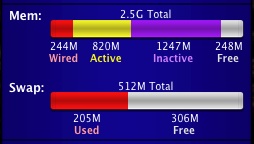
Well, a couple of weeks ago I finally decided to buy another gig of RAM, and it sure has made a big difference. I don’t feel nearly as crunched for space, and I don’t have to go through every so often and quit apps that I haven’t used in awhile. The thing is, if you have the RAM, you’ll use it. I found that out pretty quickly when I glanced at Dash Monitors after a day of working and noticed that most of my RAM was being used. Here’s a screenshot:

You’ll notice this screenshot also shows a new stat that Dash Monitors can monitor: Swap space. I’ve had a lot of requests for this feature, and I finally got around to implementing it. A lot of people just wanted to know how large the swap files were (by looking in /var/vm), but I felt that didn’t really show how much swap the computer was actually using, especially when you start using so much swap that each swap file is 1G or more. You might have a 1G swap file but only be using 50M of it, that makes a big difference. I found that by running sysctl, you can get some good virtual memory stats:


[Quiksilver:~] mike% sysctl -a vm
vm.loadavg: 0.26 0.25 0.25
vm.swapusage: total = 512.00M used = 205.92M free = 306.08M

Then it was just a matter of interfacing with sysctl APIs directly from MTK and the widget plugin. Works great, and I think it will be a good addition to Dash Monitors 1.4 when it is released.

Anyway, I think this will hold me off for a good amount of time. I still have 2 free DIMM slots, so I can always go for 1 or 2 more gigs, but by that time this machine will probably be getting close to the end of it’s life span. In the mean time, I’m happy and definitely enjoying the extra RAM.

« Older posts Newer posts »

© 2026 *Coder Blog

Theme by Anders NorenUp ↑