Life, Technology, and Meteorology

Author: mike (Page 6 of 26)

Traveling Nightmare

2008 shall now forever be known as the year of the shitty holiday travel episode. I’m writing this at 2:30am on December 24th while sitting at Chicago O’Hare airport, waiting for our flight to take off “tomorrow” morning at 8am. For some reason, our travel this year has been plagued by delays and abnormalities.

Most of this has been caused by the unseasonably snowy weather we’ve had this year. In Mount Pleasant, for instance, we’ve already had over 45 inches of snowfall this year. With our typical total seasonal average around 50-60 inches, we’re approaching that quickly with 2-3 winter months still to go. We’ve broken records for the most snow in December (around 35 inches so far). The previous record was 21 inches back in 1907…

This has made for a pretty miserable travel season. For us, it started late last week when we were driving to Rochester, NY. We were planning to leave Friday morning, but a storm was coming in, so we decided to get a head start on it Thursday night. We left at 5pm, and ended up near St. Catharines, Ontario around midnight, so we decided to stop for the night. Of course on Friday morning, we woke up to blizzard-like conditions and 4-6 inches of new snow already on the ground. We decided to tough it out, after all we only had 2 hours left to the drive, so how bad could it be? We have snow tires on the car, which make driving so much easier (usually). We spent 3 hours battling our way to Buffalo in near white-out conditions, where we decided to hold off at a family member’s house until the snow let up, passing who knows how many cars stuck in ditches along the way. Finally, after another 3 hours driving that evening, we made it to Rochester. A day and a half of traveling when it should have only taken us 8 hours.

Then, this past Sunday we were planning to get together with the family, but of course after the large storm passed, we were left with some pretty strong lake-effect snow. Some areas around Buffalo got another foot of snow that day, and it was bad enough to cancel our family party for that evening. Bummer…after spending all that time driving to NY, a good part of the reason we went didn’t end up happening at all…

Monday, we drove from Rochester back to Grand Rapids, MI. Driving this day was pretty good in general, though it was snowing pretty heavily by the time we got to Grand Rapids. We stayed the night in a hotel, with our flight to California leaving the next afternoon (Tuesday, the 23rd). Tuesday morning we woke up to another 6 inches of snow. We ran some errands that morning, and between the snow and a busy Christmas shopping day, it took us about an hour to drive 5 miles in town. We made it to the airport by around 3:30pm, without seeing any break in the snow at all during the day we were there.

Of course, with our flight going through O’Hare, I kind of expected that we might be setting ourselves up for a long travel day. Our 4:45 flight from Grand Rapids to Chicago didn’t end up leaving until 7:45pm. Our connecting flight to San Francisco was delayed until 9:15pm, and with the time change we thought we had a good chance to make it. Sure enough, we landed in Chicago at 8:10, plenty of time to make our connection, until American Airlines pulled some stupid shit…

First, we couldn’t park at our gate because there was already another plane there. Then we proceeded to taxi for 45 minutes before getting to our new gate. To top it all off, the walkway on the new gate wasn’t working, so we had to wait until they figured out WTF was going wrong. Finally off the plane, I ran over to the next departure gate (it was only 3 gates away) to find our connecting plane sitting there being de-iced. Except nobody was at the gate, and the doors were locked. I ran over to the next gate to see if they would re-open the doors (there were 10 of us making this same connection). Seems simple…finish de-icing the plane, open the door, let 10 of us on the flight, close the door back up and let’s go. Nope…they wouldn’t do it.

Now rebooking a flight shouldn’t be a problem, but with all the cancellations today, everyone is trying to rebook. We ended up waiting in line for 2 hours, but finally got a connection on United for tomorrow morning at 8am. Walking to the other terminal took us around a half hour, and then we had to wait for another hour in line at a United counter to get our new tickets issued, only to find out that American booked the tickets without actually reissuing them to United, so while our seats were reserved, United couldn’t actually give us tickets for them. A call to American and another hour waiting in line finally resulted in some tickets on the next flight out tomorrow morning.

I suppose we should consider ourselves lucky…I can’t count how many people we’ve run into that have been delayed until the 26th; had to call off their trip completely; or even worse, made it halfway to their destination only to have to turn around a fly back home. Now as long as that flight at 8am doesn’t get cancelled…
Thailand Group Study Exchange

Every year, the local Rotary Foundation district participates in a Group Study Exchange (GSE) with a Rotary district in another country. The idea behind the exchange is that the local district sends 5 people over to the remote district for 4 weeks, and on the flip side the remote district sends 5 people over here for 4 weeks as well. During the trip, the team participants offer several presentations talking about life and culture here in the U.S., or more specifically in the area in which we live. Obviously, the team also spends time touring the other country and learning about their culture. Almost everything is paid for by the local and remote Rotary districts–airfare, lodging and food are all provided. After the team returns, they are expected to share their experiences with local Rotary clubs and other organizations.

Last year the exchange was with a Rotary district in Australia, and next year I hear they are going to Spain. This year, the exchange is with a Rotary district in Bangkok, Thailand. After submitting my application and interviewing with members of the Rotary Foundation this past Tuesday evening, yesterday afternoon I was pleasantly surprised to get a call inviting me to become a member of the team this year.

My first reaction to hearing the news can be summed up in a single word: Whoa… While I had spent a good amount of time talking to Katrina and deciding whether or not to apply for the GSE, it wasn’t until I was invited to join the team that it became real. I mean, it’s 4 weeks of being away from family and friends in a country where very few people speak English and the culture is vastly different. On top of that, this is definitely not a vacation, in that we have full schedules almost every day of the trip. Gaucho Software would have to be put on hold for a month and the meteorology courses I’m taking a Central Michigan University would have to be put on hold for a semester.

On the other hand, I would get to go to Thailand! I’ve never been to Asia or even outside of North America before, so this would be quite an experience. Over there, team members are matched with someone in the other country who has the same profession, so I would get to see first-hand how software engineering and/or meteorology differs in that part of the world. 95% of the Thai people are Buddhist, so I would get to learn more about that religion and see tour Buddhist temples. Not to mention the architecture of other buildings, the excellent food, and the list goes on and on.

This morning, I formally accepted the invitation and now the preparation begins. Wish me luck…

Wireless Network

When upgrading to the ASA 5505 router, I was left in a situation where there would be two routers on my home office network: the ASA acting as a main wired router, and my old Linksys router acting as a host for wireless clients. The ASA was connected to the cable modem to my provider, and I set the internal network to 192.168.1.0. The wireless router was a host on that internal network with a WAN IP of 192.168.1.5 and a LAN network of 192.168.5.0. This works fine when accessing hosts on the internet, but it was less than ideal when trying to access the wired internal network from a wireless computer. Because of the firewall and NAT happening on the Linksys device, wireless devices were second-class citizens on the LAN.

There was this little radio button the Linksys router that would switch the device from Gateway mode to Router mode. Hmm, that looked promising, so I tried it. This was nice, because NAT was no longer active…a host on the 192.168.1.0 network could talk to a host on the wireless 192.168.5.0 network. The drawback was that I would have to add a separate route from wired hosts to send traffic to the 192.168.5.0 network through 192.168.1.5 instead of the default ASA gateway at 192.168.1.1. With the relatively small size of my network here, that’s not much of a problem, but I still felt there should be a better way.

Since I wanted to stick with one default route of 192.168.1.1, I looked into adding another VLAN to the ASA box, to see if it could route packets to 192.168.5.0 down the port that connects to the wireless router. Unfortunately, my ASA is only licensed for 3 VLANs which are all in use (outside link, inside link, and DMZ). I could spend a few hundred bucks upgrading my ASA license to support more VLANs, but it just didn’t seem worth it.

Another option is to add a managed switch to the internal network and use that to setup VLANs. New hardware is always fun, but again this would cost a couple hundred bucks and there has to be another way…

Finally, the solution became immediately obvious…so obvious that it’s amazing I hadn’t thought of it before. Instead of connecting a wire from an internal port on the ASA to the WAN port on the Linksys, I tried connecting from the same internal port on the ASA to an internal LAN port on the Linksys, leaving the WAN port on the Linksys unused.

This setup works perfectly. I changed the internal network of the Linksys to the same 192.168.1.0 as the ASA internal network, and gave the Linksys an internal IP of 192.168.1.2. The ASA is already running a DHCP server on the 192.168.1.0 network, so I disabled the Linksys DHCP server. Wireless hosts are now first-class citizens on this network…

ASA Port Forwarding

I came across the first less-than-trivial configuration situation on the ASA router this morning—port forwarding. On consumer routers, this is absolutely simple to setup, just specify what port number you want to forward and select the internal IP to forward it to. On the ASA, it’s a bit more complicated, and I decided to document it here in case anyone is Googling around for an answer. For this example, we are forwarding incoming traffic on port 8080 to a device on the internal network using the same port number.

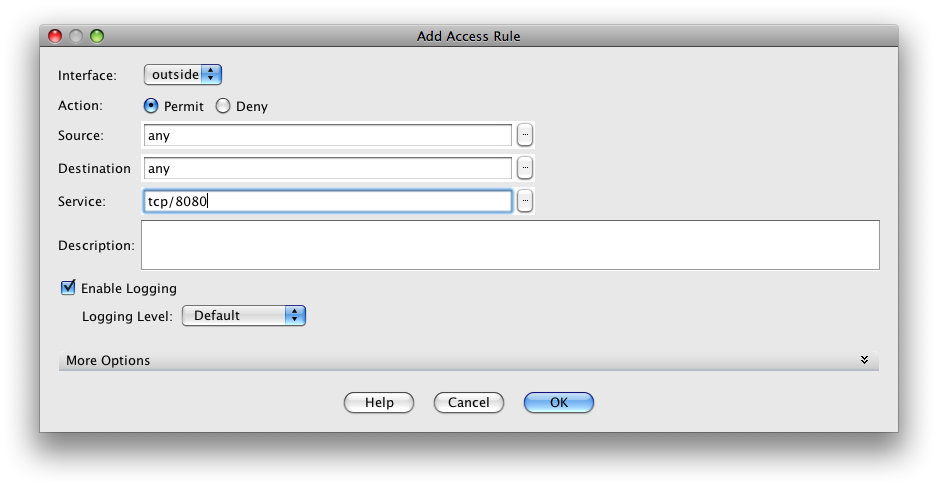
First, you have to add the port to be forwarded to the outside interface’s access list. In ADSM, go to the Configuration panel under the Firewall section. Then click on Access Rules, and select the outside interface in the table. Click the Add button. Here, use the following settings:

  • Interface: outside
  • Action: Permit
  • Source: any
  • Destination: any
  • Service: tcp/8080 (or any other port number you would like to forward)
  • Description: (optional)
  • Enable Logging: (optional)

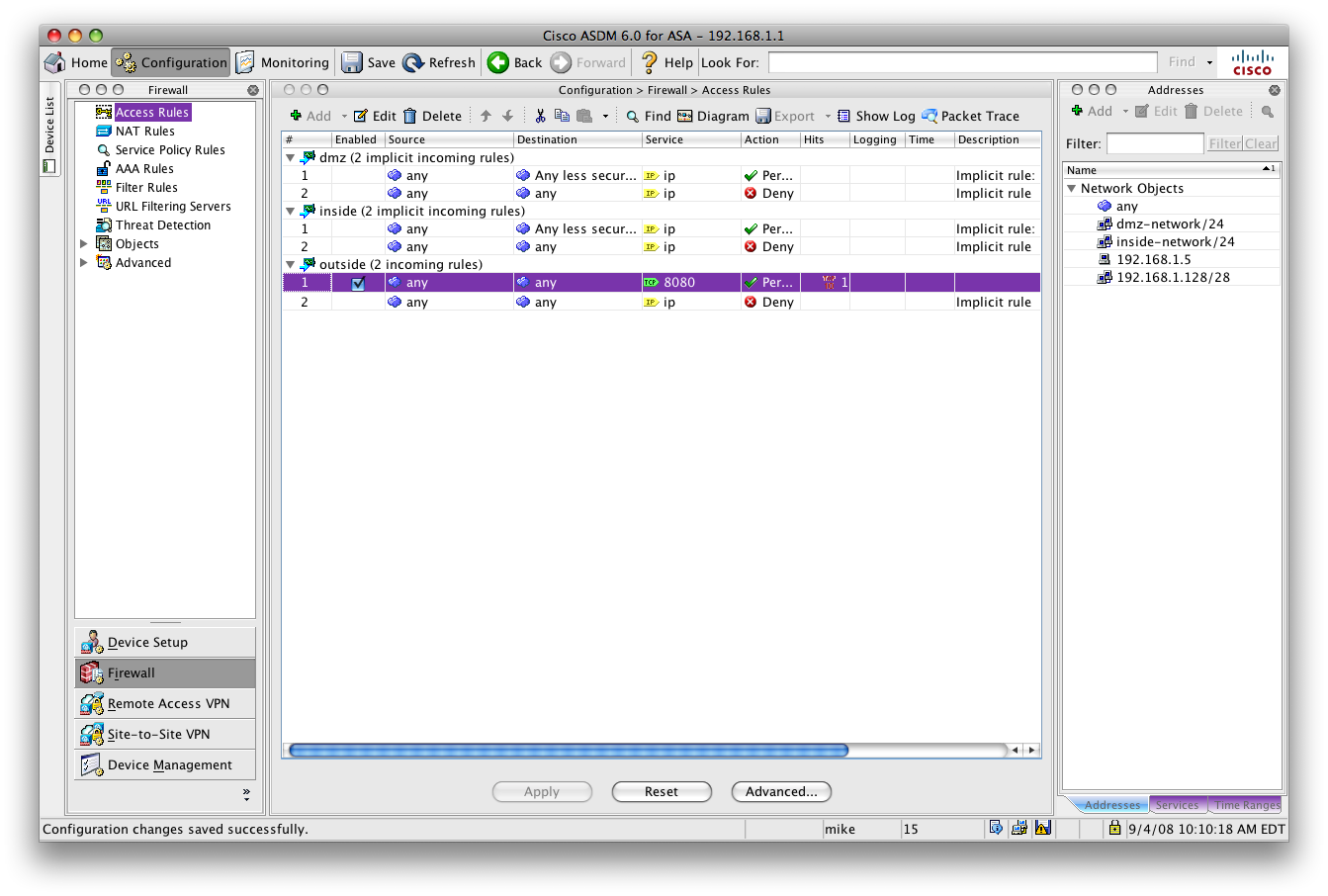
Click OK to add the access rule. Then click Apply at the bottom to upload the configuration to the router. In the end, it should look like this:

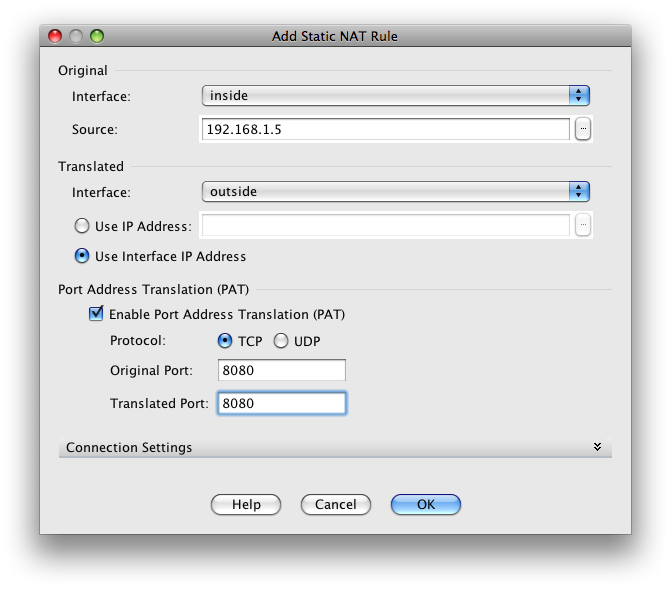
Now that we are allowing traffic on that port, we need to tell the router where to send the traffic. Click on the NAT Rules section and click the Add button to add a Static NAT Rule, using the following settings:

  • Original Interface: inside
  • Original Source: 192.168.1.5 (replace with internal IP)
  • Translated Interface: outside
  • Translated IP: Use Interface IP Address
  • Enable Port Address Translation (PAT)
  • PAT Protocol: TCP
  • PAT Original Port: 8080 (replace with your port, on the outside interface)
  • PAT Translated Port: 8080 (replace with your port, on the internal device)

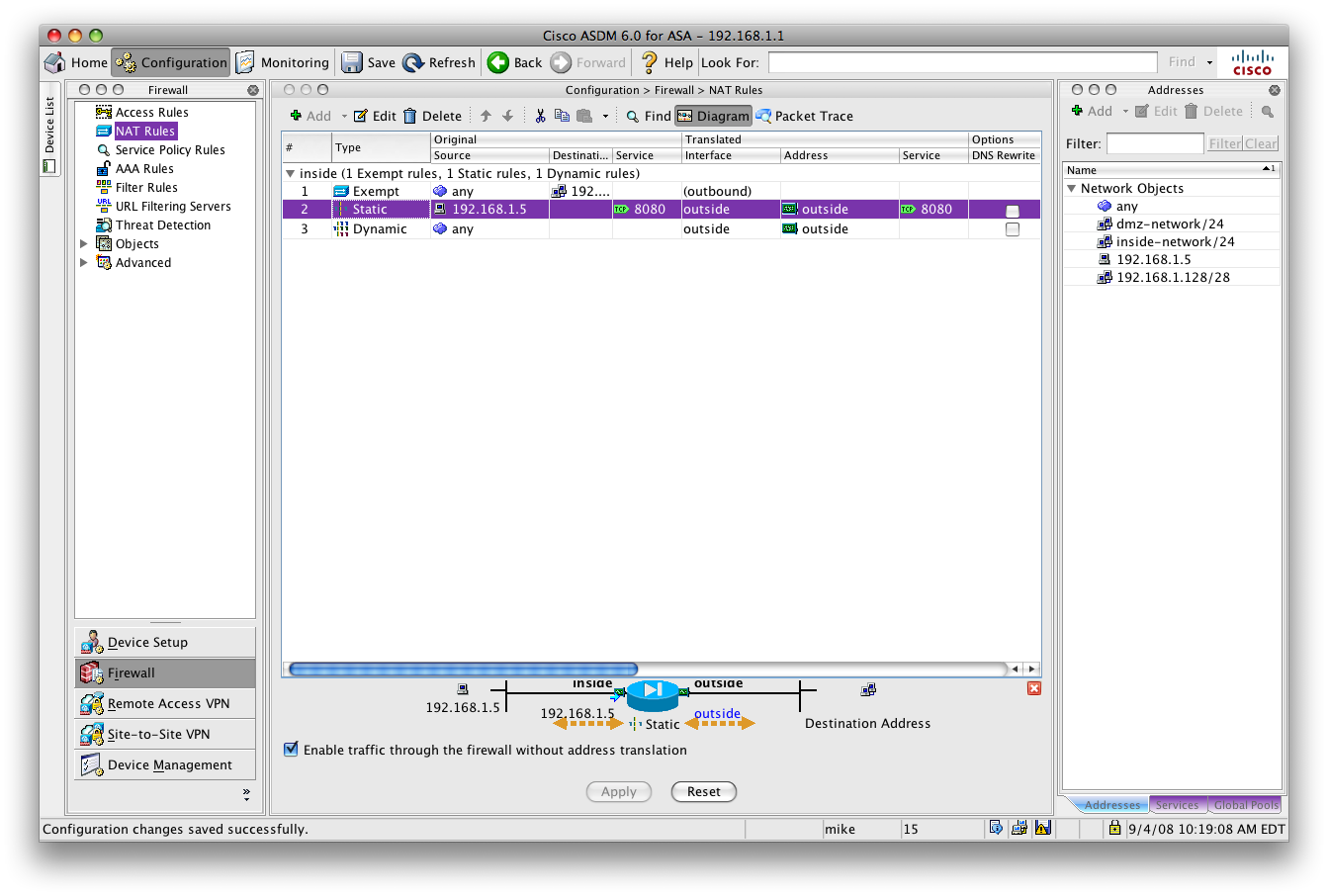
Again, hit OK to add the NAT rule and apply the settings to the router. It should look like this:

That’s it, you’re done!

Updated Gaucho Network

For quite some time now, I’ve been wanting to upgrade my office network, which doubles as my home network as well. From the business standpoint, I wanted some more reliable equipment along with some added security by enabling me to connect to the office network over a VPN when I’m on the road. From the home standpoint, I wanted to add a couple of ethernet outlets upstairs, mostly to enable the quick transfer of media from the file server downstairs, as wireless can be pretty slow.

A few weeks ago, I finally took the initiative and started looking at some equipment. For networking, no one is going to blame you for ordering Cisco equipment, so I started there. Their routers start at about $350-400 and move up from there pretty quickly, which is more than I originally was looking to spend, so I started looking at a few other brands. Brands like ZyXEL offer less-expensive business-grade equipement at about half the price, and I checked all the high-end equipment offered by consumer brands like Netgear and Linksys.

It didn’t take long to rule out the consumer equipment. While a lot of the features were there, I was constantly running into reviews complaining about reliability issues, and to me that was a key issue. Another common issue with consumer equipment was bandwidth capacity. A lot of them only handled around 15MBits, with some others moving up to 50-75MBits. VPN speeds were definitely slower, most of the time running around 10MBits because of the extra processing required to encrypt the packets. Ignoring VPN, these routers were faster than my network connection (10MBits), but I was looking more for something to handle up to 100MBits so it would grow with my connection for many years to come. Despite this limitation, a lot of them had gigabit connections on the WAN side. Not sure why…

While doing my research, I kept going back to look at the Cisco router. I was looking specifically at their ASA line of products. The ASA line replaces the older PIX routers, and there is quite a model spread from the 5505 for small office environments, all the way up to the 5580 for the enterprise. Even at the low-end, the 5505 was able to handle 150MBits of throughput for unencrypted traffic, and an impressive 100Mbits of VPN traffic bandwidth. All of the reviews said the device was rock-solid and never crashed. Setup seemed to be a bit more difficult, with a lot of it taking place on a command line, but I have some past experience with Cisco’s IOS and thought this would be a good time to brush up on my knowledge. Finally, with support for VLANs, an 8 port Cisco switch built-in with 2 power-over-ethernet ports, and an insane 10,000 simultaneous connections supported, it was hard not to like this device.

I ended up going for it, and shiny new 5505 is sitting on my desk. The device is a lot easier to configure than I originally expected. The device arrives with a dynamic configuration by default, so it just worked when I plugged it in to my network. There is an online Java application that is hosted on an HTTPS server. Configuring the VPN end-point and getting the iPhone to connect to it and split-tunnel all traffic through the router took all of 20 minutes. It’s taking me a little longer to configure my Mac to connect over the VPN, but I just need to spend some more time on it. I find it ironic that the iPhone is more prepared for the enterprise than the Mac is. Overall, I couldn’t be happier with my decision.

Switching gears a little bit here, from the home side of adding additional outlets, I bought a 24 port patch panel to punch down all the cabling on, and 500 feet of Cat 5e to wire it all up. Cat 6 was definitely a consideration but it cost twice as much, and with Cat 5e handling gigabit just fine I saw no need to spend the extra money. If 10-gigabit starts becoming standard, I’ll just upgrade the cabling in my office.

Dropping the lines from upstairs has been a bit more difficult than I was expecting. I naively expected to be able to look up the wall from the basement and see the outlet connection box from below. Of course, this isn’t the case, as each wall has a bottom 2×4 to complete that edge of the frame. I’m still working on finding the best way to send the wire through a small hole in the connection box, and target a small hole at the bottom of the wall frame.

I still have some work to do, but will try to update this with photos when the job is completed. Stay tuned.

Customer Service

There have been two instances of excellent customer service that I’ve experienced recently. The service offered in both instances was so good, that I decided to blog about them.

The first experience took place just before WWDC this year. Usually after a year of hammering on a laptop battery, I pick up a fresh battery before the conference, simply because it’s important that the laptop works all day while taking notes in the sessions. Usually I replace the battery with an Apple standard battery, but this year I decided to give a third party a shot. FastMac has a battery for the MacBook Pro that claims it will last longer than the Apple one, and it’s about $20-30 cheaper too. I ordered it and waited patiently for it to arrive.

After hearing nothing for about a week (and WWDC getting dangerously close), I decided to give them a call. The person I talked to was apologetic, stating that they ran out of stock just before my order was placed. Bummer. Fortunately, FastMac did have new Apple batteries in stock, and not only did they offer to switch my order, they added rush shipping to make sure it would arrive before the conference, and knocked the price down to $10 less than they were charging for their own battery. The unit arrived with a day or two to spare, and overall it was a great example of a company going the extra mile.

The second experience happened just a few days ago. I’m installing a new network here at the office, and part of that new network was a Cisco router. As usual, I ordered the new equipment from NewEgg. It arrived, and seemed to work okay out of the box, but for some reason I was unable to connect to the device using the ASDM or over the web configuration interface. I called up Cisco, and the tech I spoke with there spent an hour and a half on the phone with me trying to troubleshoot the issue. The nice thing was their use of WebEx to help troubleshoot, so they could share my Desktop here and work with the router themselves directly. In the end, it was determined that the router I received had a corrupted flash chip, because we were unable to write any new data to the flash disk.

I went through NewEgg’s online exchange interface, and it was looking like I needed to pay to ship the damaged router back to them (shipping of the replacement device was free). I was a bit put off by this. While I agree it wasn’t NewEgg’s fault I received a bum router, I also shouldn’t pay extra for something that wasn’t my fault either. When calling up NewEgg to ask an unrelated question, the representative I was speaking to noticed that I was charged shipping to return the damaged device. Not only did he refund the return shipping amount, but he also put through an order for the new device to ship before they received the damaged one. To top it all off, he upgraded the shipping on the replacement to next-day air for free.

In this last situation, both Cisco and NewEgg get major props for great service. The new router arrived and it’s worked perfectly from the get-go.

New Disk

Having an application like Seasonality that relies upon online services requires those services to be reliable. This means any server I host has to be online as close to 100% of the time as possible. Website and email services are pretty easy to host out to a shared hosting provider for around $10-20/month. It’s inexpensive, and you can leave the server management to the hosting provider. For most software companies, this is as far as you need to go.

This also worked okay when Seasonality was simply grabbing some general data from various sources. As soon as I began supporting international locations, I stepped out of the bounds of shared hosting. The international forecasts need to be hosted on a pretty heavy-duty server. It pegs a CPU for about an hour to generate the forecasts, and the server updates the forecasts twice a day. Furthermore, the dataset is pretty large, so a fast disk subsystem is needed.

So I have a colocated server, which I’ve talked about before. It’s worked out pretty well until earlier this week when one of the 4 disks in the RAID died. Usually, when a disk in a RAID dies, the system should remain online and continue working (as long as you aren’t using RAID 0). In this situation, the server crashed though, and I was a bit puzzled as to why this occurred.

After doing some research, I found that the server most likely crashed because of an additional partition on the failed disk—a swap partition. When setting up the server, I configured swap across all four disks, with the hope that if I ever did go into swap a little bit it would be much faster than just killing a single disk with activity. The logic seemed good at the time, but looking back that was a really bad move. In the future, I’ll stick to having swap on just a single disk (probably the same one as the / partition) to reduce the chances of a system crash by 75%.

After getting a new disk overnighted from Newegg, I replaced the failed mechanism and added it back into the RAID, so the system is back up and running again.

This brings up the question of how likely something like this will happen in the future. The server is about 2 and a half years old, so disk failures happening at this age is reasonable, especially considering the substantial load on the disks on this server (blinky lights, all day long). At this point, I’m thinking of just replacing the other 3 disks. That way, I will have scheduled downtime instead of unexpected downtime. With the constantly dropping cost of storage, I’ll be able to replace the 300Gb disks with 750Gb models. It’s not that I actually need the extra space (the current 300s are only about half full), but I need at least 4 mechanisms to get acceptable database performance.

In the future, I will probably look toward getting hot-swappable storage. I’ve had to replace 2 disks now since I built the server, and to have the option of just sliding one disk out and replacing it with a new drive without taking the server offline is very appealing.

Catchup

Wow, I think this is the first time I’ve opened MarsEdit in months. Looks like my last post was back in February, so I figure an update here is long overdue. I don’t have any particular topic to talk about today, so this post will be a catchup of everything happening here in the past 3 months.

The biggest change has been a new consulting gig I picked up back in March. Clint posted on Twitter about a contract position for an iPhone developer on the Ars Technica Job Board. The kicker is that the job was to code a weather application. I had been curious about iPhone coding, but didn’t have time in my development schedule to fit another pet project. On the other hand, if I could learn iPhone development while getting paid, I could definitely shift some projects around. Being a weather app, this job matchup was too good to pass up; so I sent in my resume one morning back in March. That afternoon, the company got in touch with me for an interview, and the following week I flew out to their headquarters to get up to speed on the project.

The development cycle for this app was pretty quick. With the first deadline of a working demo only 3 weeks from the day I started, I really booked it and started pumping out code. My life was pretty much coding, from time I woke up until going to bed. A rough, but fairly good demo was completed, with 10k lines of code in those first 3 weeks. I had about a week off, which incidentally was the same week of my 30th birthday. It was great to take a little bit of time off, party with some friends, and enjoy life.

Then the second stage of the project kicked in, which needed to be completed in only 2 more weeks time. The second stage was definitely slower, so I was able to sleep a little bit more, and see Katrina from time to time. 🙂 The resulting stage 2 app was pretty polished. The company I’m working with has a few contacts at Apple, so they arranged to demo it in Cupertino. That was a couple of weeks ago and from what I heard, the demo went pretty well. All the work definitely paid off. You should be seeing this product hit the market some time this summer. I’ll definitely post more about this when the time comes.

Our Moke After all that work and Katrina’s semester coming to a close, we decided to take off on a vacation. We found a great deal on airfare and hotel down to Barbados, so we decided to jump on it. We spent last week on the south coast of the island soaking up the sun, learning the culture, having a blast driving around in our little moke (see photo), and just getting some good R&R. There’s not a ton of stuff to do on the island, but definitely enough to keep you occupied for a week or two. We toured one of the 14 Concorde jets in existence, visited some caves, walked a historical museum, snorkled with some sea turtles, and enjoyed some excellent food.

With a constant 15 mph trade wind, the surf on Barbados was better than any other Caribbean island I’ve visited. Furthermore, our hotel room opened up onto the beach, so I was able to walk about 50 feet from our patio and paddle out to bodyboard. Needless to say, several surf sessions took place that week.

With summer finally finding it’s way to central Michigan, the mountain biking season has now begun. Bodyboard being a fairly difficult activity in Michigan, mountain biking has become my main form of exercise. For the past 10 years, I’ve been riding a Trek hardtail. I’ve put over 3000 miles on it, and the gears are almost completely shot. So I was posed with a decision of either spending a couple hundred bucks on a new set of cogs, bearings, and a chain, or breaking down and purchasing a whole new bike.

I had been looking at getting a full suspension bike for the past few years, so I started visiting bike shops around here to ride some different models. I had hit every bike shop in a 30 mile radius, without any luck. Finally, while we were down in Lansing for the day, I checked a few bike shops down there and found my new ride. Of course the bike shop didn’t have the right frame size, so I had to order it.

New Bike

A week later, it arrived, and I picked it up the day after we got back from Barbados. So far, I love it. It’s a Trek Fuel EX 5.5 complete with disc brakes, 3-5 inches of adjustable travel in front, and 5 inches of travel in back. Clipless pedals were not included so I swapped mine out from the old bike. I also added a seat pack (with tools to fix a flat and a few other necessities) and installed a new speedometer. My previous bike was so old, that even with the full suspension upgrade and a much beefier frame, this bike is lighter than my last. This weekend will be the first time I take it on the trail…definitely looking forward to it.

Looking toward the summer, I’ll be headed out to WWDC in San Francisco next month. A lot of good parties are starting to fall into place, so it should be a fun week. After that, we’re heading over to camp in Yosemite for a few days before coming home and spending the rest of the summer here working.

CFNetwork Versions

Sometimes it’s important to know what version of Mac OS X your users are running, especially when making decisions on what versions of OS X to support in future software releases. In the case of Seasonality 2.0, I have decided to take advantage of all the developer changes in Leopard, both to make Seasonality a better application, and to shorten my development time (thus giving me more time to work on additional features).

Previously, I haven’t performed any OS statistics on user data. It would be easy to do, since Seasonality downloads forecast and image data from a web server here at Gaucho Software, but I haven’t written the code required. However, some of these Seasonality data requests are using the typical CFNetwork methods of downloading data, and these connections provide the current CFNetwork version in the HTTP UserAgent, and thus will show up in my web server logs.

The problem is that I have been unable to find any kind mapping between CFNetwork versions and the corresponding version of Mac OS X. I decided to take it upon myself to generate (and hopefully maintain) such a list here. Most of this data is from viewing the Darwin source code on Apple’s web site, but some of these are just from personal observations, and some are educated guesses (marked with a question mark).

HTTP UserAgent   Version of Mac OS X
CFNetwork/454.4   Mac OS X 10.6.0
CFNetwork/438.14   Mac OS X 10.5.8
CFNetwork/438.12   Mac OS X 10.5.7
CFNetwork/422.11   Mac OS X 10.5.6
CFNetwork/339.5   Mac OS X 10.5.5
CFNetwork/330.4   Mac OS X 10.5.4
CFNetwork/330   Mac OS X 10.5.3
CFNetwork/221.5   Mac OS X 10.5.2
CFNetwork/221.2   Mac OS X 10.5.2 Developer Seed?
CFNetwork/220   Mac OS X 10.5.1?
CFNetwork/217   Mac OS X 10.5?
 
CFNetwork/129.22   Mac OS X 10.4.11
CFNetwork/129.20   Mac OS X 10.4.9 – 10.4.10
CFNetwork/129.18   Mac OS X 10.4.8
CFNetwork/129.16   Mac OS X 10.4.7
CFNetwork/129.13   Mac OS X 10.4.6
CFNetwork/129.10   Mac OS X 10.4.4 – 10.4.5 (Intel)
CFNetwork/129.9   Mac OS X 10.4.4 – 10.4.5 (PPC)
CFNetwork/129.5   Mac OS X 10.4.3
CFNetwork/128.2   Mac OS X 10.4.2
CFNetwork/128   Mac OS X 10.4.0 – 10.4.1
 
CFNetwork/4.0   Mac OS X 10.3 or earlier

Edit: A more modern list of UserAgents can be found here.

GRIB2 Migration

A few days ago I started having a problem with the previous GFS forecast data source I was using for Seasonality forecasts. Just as a bit of background, Seasonality will download forecasts for U.S. locations from the NWS’s NDFD service. For locations outside the U.S., I have to get the data from somewhere else, and the best data source I’ve been able to find is 0.5 degree GFS model output, also available from the NWS. Because the GFS model data is in GRIB format and very large, I first download it to a “forecast” server that I host, and throw it all into a database. Then Seasonality will contact my forecast server to get the forecast for its configured locations.

With the old GFS data source offline, I had to find a new one. I came across a production server at NCEP that hosted 0.5 degree GFS model output, but the data was in GRIB2 format, which presented a problem because up until this point, all of my forecast data was in GRIB (or GRIB1) format.

Fortunately, there were very few modifications because of the format change, but there are some adjustments that needed to be made. I am using the wgrib and wgrib2 tools to convert the GRIB data to ASCII format first, so it’s easier to parse when importing it into the database. With wgrib, I would use a command like this to convert the data to ASCII:

wgrib -s <grib_file> | egrep \":<variable>:<level>\" | wgrib -i -grib <grib_file> -text -o <txt_file>

The authors of wgrib2 changed things a bit, and actually made the command a little bit easier:

wgrib2 -s <grib_file> | egrep \":<variable>:<level>\" | wgrib2 -i <grib_file> -text <txt_file>

The first two commands in the string don’t change at all, but the third one does. The -grib and -o flags are no longer needed. wgrib2 assumes that the input file is in GRIB2 format, and if you specify -text, the next argument is assumed to be the output file. The problem was that my output data wasn’t right. For some reason, my forecasts were just all screwed up, even though the ASCII files themselves looked okay. I ended up finding some documentation on the -text flag, and it seems that the default output order has been changed from the original North->South to South->North, so all of my data was being inverted. This was somewhat problematic, since I don’t really want to return a forecast for the southern hemisphere when someone asks for a location in the northern hemisphere. The fix is fairly simple, just pass -order raw to the wgrib2 command…

wgrib2 -s <grib_file> | egrep \":<variable>:<level>\" | wgrib2 -i <grib_file> -order raw -text <txt_file>

In general, it looks like most of the NWS datasets will only be available in GRIB2 in the near future, so I hope this information saves other wgrib users some time when doing their own GRIB -> GRIB2 migrations.

« Older posts Newer posts »

© 2026 *Coder Blog

Theme by Anders NorenUp ↑