Life, Technology, and Meteorology

Year: 2006 (Page 1 of 5)

Northwest Storm

James Duncan Davidson writes:

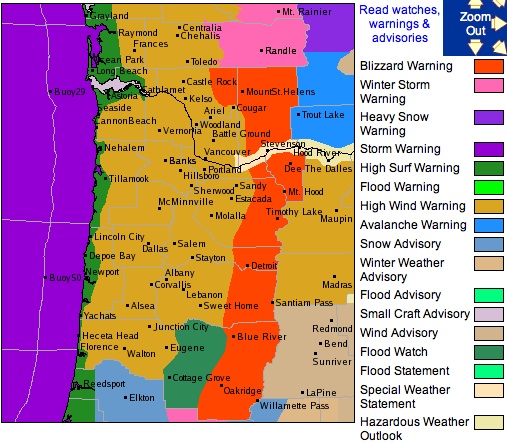
Here in the Pacific Northwest, we’re prepping for a big storm that’s set to rip through tonight. Hurricane force winds are forecast on the coast, blizzard conditions are forecast for the Cascades, and it looks like we’re going to get rattled about here in Portland. Already, the winds are gusting about and hitting 40mph.

I just caught wind (no pun intended) of this storm earlier this afternoon. There are storm warnings covering the entire coastline of Washington and Oregon, and even part of Northern California, this is definitely going to be a big one. I even saw a High Surf Warning with estimated swell heights of 38-42 feet. If you’re in that area, hunker down and stay safe.

Seasonality 1.4

I released Seasonality 1.4 out into the wild this morning. So far the release is going pretty nicely, without any major bugs found as of yet. I’ve been using the beta for the past few months without finding any major issues, so I kind of expected this to be a pretty stable release. The forecast server here has dished out over 700,000 forecasts up through yesterday (that’s without a final Seasonality release hitting it). I’m interested to see how long it will take to hit a million with this official release of version 1.4. Thanks go out to everyone who helped beta test this release.

Also, with the risk of writing about out-of-date news, I’ve posted a couple of weather articles over on the Gaucho Software Forums. First is an explanation for the fairly quiet Atlantic hurricane season this past year. I talk about some of the ingredients needed to form a hurricane, and what has been missing this year. The second article, posted last week, explains why why relative humidity is a bad measure of moisture in the atmosphere. If you’re interested in either of those topics, be sure to check out these articles. As a side note, I am patiently waiting for the next release of YaBB Forum software, which has RSS support so users will be able to subscribe to these weather articles I post. They have a feature-lock on the release, but no word yet on an expected release date.

Disk Image Details

Expectations are high when you release a piece of software for Mac OS X. Every part of the interface has to be top-notch, even the disk image which may only reside on the user’s computer for a time period of a few minutes while they install your app.

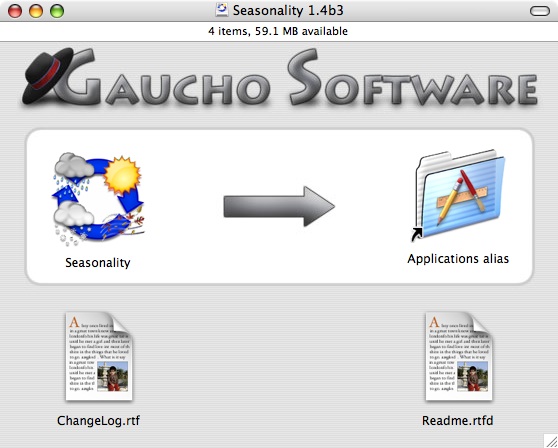
For Seasonality 1.4 I decided it was time to refresh the look of the disk image a bit. I had a custom background image previously, but it looked a lot like the Gaucho Software website, and I didn’t think that branding was appropriate for the DMG. A few months ago I came across a blog posting over at Software Trenches with some good comments regarding different DMG designs. There are some very nice background images displayed there, but the one that stood out to me was that of Adium. It was clean, easy to read, and matched the style of OS X pretty well. I decided to base the new Seasonality DMG off of that type of design. Here is what I came up with…

At the top I have the standard Gaucho Software text and logo, complete with drop shadows where appropriate. The background has some very faint pin-striping, just to add a bit of texture and depth. It’s also a tribute to older versions of Mac OS X. Below that you see a highlighted box, which draws the user’s attention to the immediate action that needs to be performed to install Seasonality. I spent some time working on the arrow, and decided to match it’s look with the text above. Finally, at the bottom you have a couple of supporting documents.

One nice thing about this DMG design is the icon spacing. It’s setup so the icons are at the default grid spacing of Mac OS X, so this will save me the trouble of lining up the icons exactly every time I create a DMG.

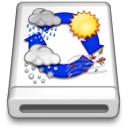
An aspect of a DMG archive that is commonly overlooked is the disk image icon. A lot of apps use the standard disk image icon. A small subset of apps will go one step further and place their application’s icon on top of the standard disk image, to make that particular DMG stand out more. What most developers overlook is keeping the 3 dimensional aspect in check. Just pasting the application icon on top of the disk image icon will result in the app icon that does not match the 3D perspective on the disk image. To fix this, I make a couple of Skew adjustments in Photoshop, and the disk image icon below shows the completed results. This makes the icon more believable and adds that final touch.

Midwest Snow Storm

If you live in the Midwest, either you are getting hit with this storm right now or you will be getting hit with it soon. This storm has the potential to be the first big snow for the year in many areas. The forecast models have been all over the board with predicting this event. At least, that was the case up until earlier today when the 0Z and 12Z runs of the GFS and NAM, along with some other models are now much more agreeable with this storm’s track. When the models line up, that’s a pretty good sign of an accurate path.

ย 

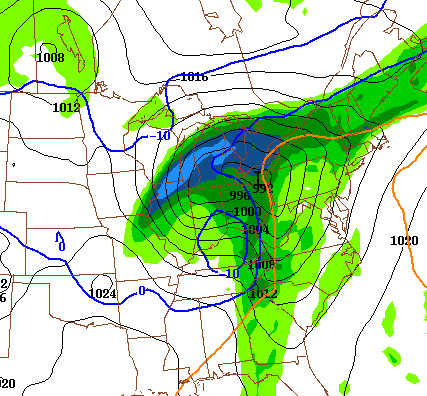
The image below shows the precipitation forecast for Friday between 12 and 18Z (7am – 1pm EST). Right now, this system is starting to form in Texas. The storm will be traveling NNE over the next 36 hours to around Ohio in the time period of the image below. The precipitation “arrow” is pretty much pointing in the direction this thing is moving. The lightest blue is between 0.75 and 1 inch of liquid equivalent precipitation… However, if you follow the deep blue line marked 0 degrees C, all of this area will be getting either a rain/snow mix or all snow. 1 inch of liquid precipitation can equate to anywhere between 6-10 inches of snow depending on the temperature. Since this image just shows the precipitation for a 6 hour time period (and not the entire storm’s precipitation), there is a real potential of a bunch of snow being dumped along it’s path. Some models have forecasted up to 17 inches here in central Michigan, but I think that’s really overshooting it. I’m guessing it will drop around 6-8 inches of heavy snow for our area, and definitely more in some other areas.

Anyway, here’s hoping we’ll get enough snow to go sledding this weekend. ๐Ÿ™‚

Mac360 Reviews Seasonality

I’m a bit behind on this one, but a few weeks ago Jack Miller over at Mac360 reviewed Seasonality

Itโ€™s one thing to know if itโ€™s sunny or cloudy, cool or cold, warm or hot. Many Mac utilities give you quick access to the weather.

Seasonality becomes your weather center. It does everything but control the weather.

I ran across a problem in the latest betas of Seasonality where the graphs would show up blank when printing. It took me awhile to fix this issue, so I thought I would post my solution here in the hopes that it might save someone else time in the future. Here’s a screenshot of print output before the fix:
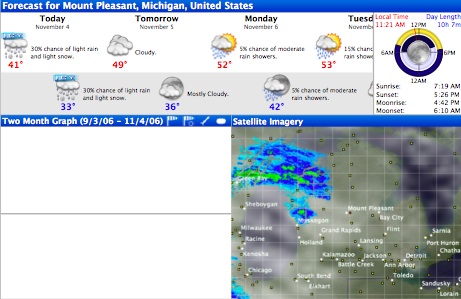
The problem is that the Seasonality graphs are drawn using Core Graphics routines instead of the higher-level Quartz routines. I did this to squeeze a little more speed out of the drawing code, and also gained more customization with transparency settings and layered drawing. Basically, I grab a CGGraphicsRef using [[NSGraphicsContext currentContext] graphicsPort], and use it to draw all the other elements.

From what I could find online, it seemed that the problem was that while printing, the context isn’t referenced until later than it is when drawing it to screen, so the context doesn’t stick around long enough for the printing code to pick up on it and draw. So either I could find a way to retain the graphics context long enough for the printing to complete, or I could find a new way to draw my view for the printer. I didn’t want to retain a graphics context object because I think that makes the code a little messy, so I tried to find a new way to draw my view.

The first thing that came to mind was to not use all the Core Graphics routines to draw the graphs when printing. That would be a very large code change, and it’s a lot of extra code that isn’t used too frequently. The better solution I found was to draw everything to an NSImage first, and then draw the NSImage to the printer. Here’s some code…

- (void)drawRect:(NSRect)rect {
   NSImage *lockedImage;
   BOOL printing = ![NSGraphicsContext currentContextDrawingToScreen];
   if (printing) {
      lockedImage = [[NSImage alloc] initWithSize:rect.size];
      [lockedImage lockFocus];
   }

   // Get our graphics context.
   CGContextRef cgContext = [[NSGraphicsContext currentContext] graphicsPort];

   // Drawing code here...

   if (printing) {
      [lockedImage unlockFocus];
      [lockedImage drawInRect:rect
                     fromRect:NSMakeRect(0, 0, rect.size.width, rect.size.height)
                    operation:NSCompositeCopy
                     fraction:1.0];
      [lockedImage release];
   }
}

Here’s a screenshot of the output after the fix:
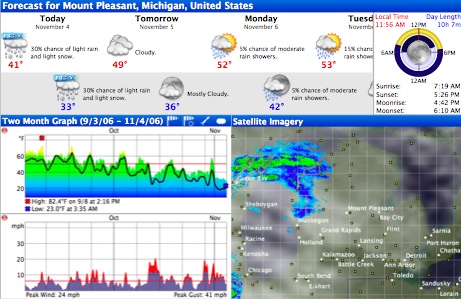
This solution has a small disadvantage, you don’t get the ability to print using the printer’s full resolution. Since Seasonality users don’t print too often, this tradeoff is okay, but it might be an issue to consider for other applications.
« Older posts

© 2026 *Coder Blog

Theme by Anders NorenUp ↑