Life, Technology, and Meteorology

Year: 2003 (Page 1 of 2)

Loving and Hating Objective C

Jonathan Rentzsch has an interesting blog posting listing the top 10 things he loves about Objective C and the top 15 things that he hates about Objective C. If you are at all interested in Objective C, check it out.

I would have to say that categories is my favorite Objective C feature. In case you don’t know, categories allow you to add methods to a class definition without changing the original class. This means that you can add functionality to classes that you don’t even have the code for. In the past, to accomplish something like this, I would create a subclass of the original and add my method there. Categories are much more useful because any object of the type that is being categorized automatically obtains the new functionality without any changes in code.

Yahoo's new Anti-SPAM idea

While it seems that it will take a long time before something like this is implemented, Yahoo announced today that it is coming up with a new way to verify the origin of all email. While, the concept isn’t necessarily new, the implementation would be. Basically, they want to require all mail servers to have their own PGP key pair for a domain. In order to send mail, the sending server would include a small header containing a signature created by encrypting the message hash with it’s private key, and the receiving server would check to make sure that the signature decrypts with the public key to the hash that matches the message content.

This seems like a great idea to me. 90% of the SPAM that I get is from yahoo.com or aol.com addresses, but don’t originate from their servers. This would force people to send mail from their real network domain. Of course, this would cause a whole new set of problems. People would have to make sure their private keys are kept private (I can see it now…”Buy our CD of 100 million private keys for $99.95!”). There would also have to be an easy way of issuing a new key to a domain if for some reason they believe their private key has been compromised.

PhotoStickies and Tailer+

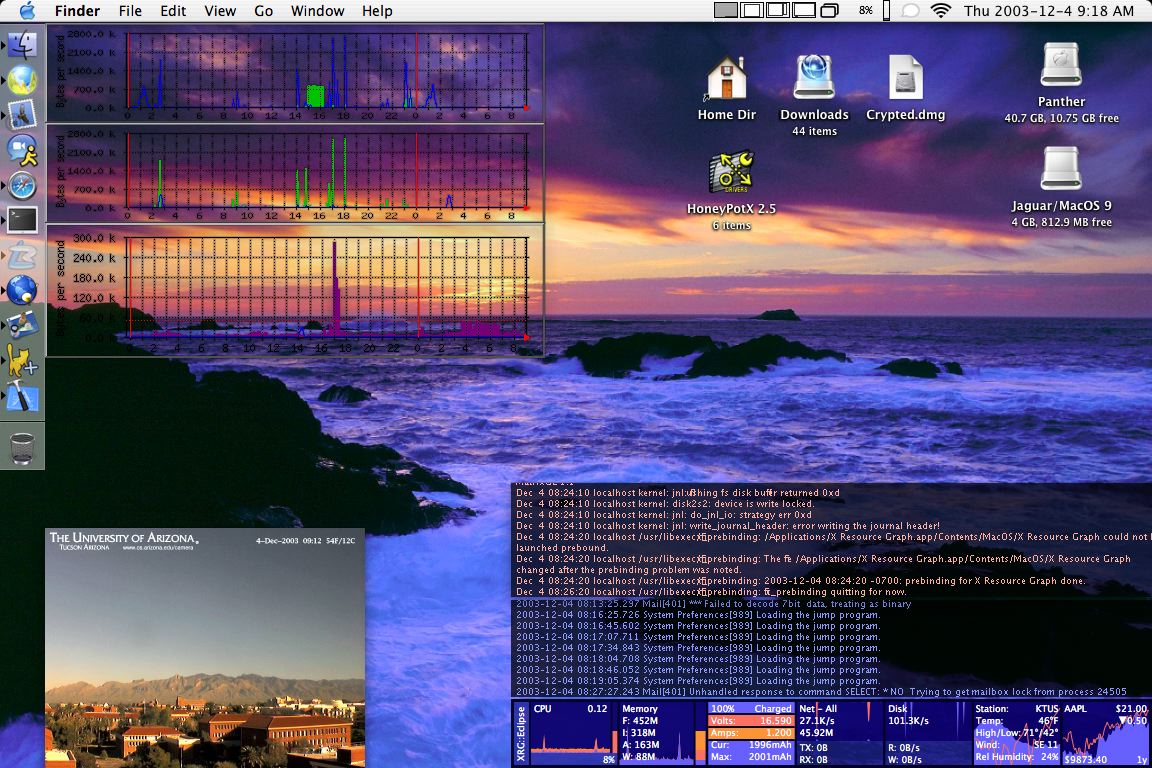
In the past couple of days I have discovered 2 pretty cool Shareware/Freeware applications for MacOS X. Short descriptions follow along with a screenshot.

The first is a freeware application called PhotoStickies by Christian Grunenberg. PhotoStickies allows you to show images in borderless windows. You can open either a local image or a image hosted on the web, and the nice part is that you can set a refresh time for that image. This is perfect if you want to monitor a webcam or system monitor graphs and don’t want to fill your desktop with several web windows. Another plus to this app is that you can order the windows to be below all others, so they aren’t getting in your way all the time.

The second app is shareware ($15) and is called Tailer+ by Chris Schleifer. Tailer+ allows you to display borderless text windows and either get the text from a command, or “tail” a file on the hard drive. The unregistered version allows up to 3 windows. Registering the app will remove that limitation. This application is still fairly new, but so far it’s looking pretty good and I’ve only found a few minor bugs.

Here’s a screenshot of both programs running on my Powerbook. In the top left corner, you can see 3 PhotoStickies windows monitoring various network bandwidth graphs created by MRTG. Then in the lower left corner I have a PhotoSticky of a webcam in the CS department here at the University of Arizona. It acts as my “window” here at the office since I don’t have one otherwise. 🙂 In the lower right corner there are two Tailer+ windows (one tailing my system.log, and the other tailing my console.log), and of course I have XRG on the bottom.

Christmas Lights

Well, Katrina and I finished putting up Christmas Lights on our house for the holidays. I took a picture a couple of nights ago. You can check it out here. The blue river is on top of where we have a rock river by day. Overall, we put up 3,765 lights this year. 🙂

XRG 0.4.0 Release Summary

Hope everyone had a great Thanksgiving. I was going to post this sooner, but I got caught up in the holiday weekend. 🙂

Looking at the web stats, this release of XRG was pretty successful. The first two days are always the busiest, mostly because software sites like VersionTracker and MacUpdate will post new software on their front page for a two day period. Anyway, in that time frame, the web site served 3517 pages to 1650 visitors. In the first 5 days of the release, there were approximately 2200 downloads of the application (some people from the software sites above download the app directly, instead of visiting the web site) and 153 downloads of the source code. I wish some more of those people who downloaded the source code would contribute new features. 🙂

Anyway, overall, I’m pretty pleased with the release. It got posted on the MacNN and MacInTouch news sites, which was pretty cool. If anyone who uses XRG is reading this, let me know what you think in the writeback.

Anti-SPAM Act

I thought this was an interesting post, originally linked to on Slashdot. If you’re curious about the effects that the Anti-SPAM Act will have, check it out. Doesn’t look like it will help much at all. Gotta love the power of marketing companies as lobbyists. The only hope (as mentioned by the second comment on the post) is that Congress will notice that it doesn’t help after it is passed and finally pass a law that will stop SPAM. At the very least, they should force spammers to include the text ADV in the email subject header such as the anti-spam laws in California do. This wouldn’t save bandwidth, but it will allow people to have an easy filter added to their mailbox to take out a huge chunk of SPAM.

XRG 0.4.0

Well, after a lot of hard work, XRG 0.4.0 was just released this morning. Check the web site or the Changelog for update details. The last release was very successful and got an incredible response from users. I’m hoping that this release will be the same. I want to thank Philippe Martin his blog posting about XRG. Philippe has given me a lot of great feedback for several of the previous versions. Thanks Philippe!

I’ll post in the next couple of days more stats on the number of downloads, web hits, etc.

Cyber Bullying

Today there was an article in the Detroit Free Press about cyber bullying. Slashdot also had a story linking to the article. It’s amazing to me that these things happen, though I can’t say that I’m surprised. Kids have always done some pretty mean things, and technology now has armed them with new ways to take offense toward their peers.

Junior high and high school were already tough enough without other students taking “spy” photos and composing entire websites to give you a bad reputation. I want to know what gives these students such a strong urge to spend the time to make a website, just to put someone else down. I’d also be interested to find out how widespread this problem really is. It’s one thing to have it happen at a couple of schools, but if it’s turning into a pretty common practice, it’s definitely something to be concerned about.

I’ve always thought of technology as a very good learning tool to have in schools, but it seems that it may have come too far and has started to do more harm than good. I can see cell-to-cell video coming in the near future (see TV service on Sprint), but what new doors of “cyber bullying” will that open?

The Dock in MacOS X

I’m not one usually complains about MacOS X, but today I was thinking more critically about how the Dock works and what functions it provides.

The Dock, as many of you know, has two parts. The application part is where you can define a set of frequently used applications you would like to have easy access to. The application part also shows you which applications are currently running and acts as a quick switcher. Then there is a user part where you can drag your own folders, files, and links. Also, if you minimize a window, it gets sucked into the user section of the doc.

The applications part of the Dock seems to work pretty well. It’s easy to customize which application icons you would like to have in there by default, and the Dock does a good job of showing which applications are open and any application activity (such as a dialog popping up in the background). The user part of the Dock, however, could use some major improvement. First, what relates the two primary purposes of the user section? Why does it hold minimized windows AND shortcuts to frequently used items? Then you have the trash can thrown in there seemingly because Apple didn’t know where else to put it (I’m not sure why the bottom corner of the desktop wasn’t a good place anymore).

The other thing that bugs me is how a folder shortcut acts when it is in the Dock. When you click on it briefly, it will open a Finder window with that directory. Now this makes some sense, but I never use the Dock in this manner. This action seems even less useful now that Finder windows have a sidebar in Panther. If you click and hold on the folder icon in the Dock, it will pop-up a menu with the items of that folder. Now I find this very useful, and it should be the default action of clicking on a Dock folder icon. Waiting for a pop-up to be displayed just makes the action take too long to be useful. I know you can right-click or control-click on the icon to get this action right away, but until I get a two button trackpad on my Powerbook, this is kind of inconvenient as well. I’m sure there are some people who would prefer the current behavior, so there should simply be an option in the Dock Preferences to configure this.

One thing I feel that the Dock is missing is a section to have Dock-only dynamic content. Currently, the only way to add dynamic content to the Dock is to create an application that draws in it’s own Dock icon. This is nice to have, but it could be a lot better. There should be a separate section in the Dock altogether for this type of application, and applications should be able to create multiple Dock icons. This is something that would be especially useful for an application like XRG. It would be great if I could take as many spaces as I wanted in the Dock and draw multiple graphs there instead of in a window.

Any comments from other users out there…maybe issues that I may have overlooked? Let me know in the writeback.

« Older posts

© 2026 *Coder Blog

Theme by Anders NorenUp ↑