Life, Technology, and Meteorology

Year: 2006 (Page 3 of 5)

Weather Computing Resources

One thing I wasn’t expecting when entering the world of weather software with Seasonality was the sheer amount of computing resources that weather data and processing requires. You hear about the supercomputers that different government organizations purchase for weather forecasting and research, but I never really gave a second thought to it. I just assumed that those computers were running high-end computations in a completely different league than the typical online weather service. This is true to some extent, but I severely underestimated how many resources an online weather service can use itself.

Take for example the fairly simple idea of recording temperatures, wind speeds, pressure, and other conditions for locations worldwide. One commonly used system in place for this is a network of 4,000-5,000 different ICAO stations around the globe. This network of weather stations is the same used to generate weather graphs in Seasonality. Most ICAO stations are located at airports or military bases, but some of them are at other public facilities. Each of these stations will report their conditions, on average, maybe once an hour. Now that’s a lot of data for one day, but it seems pretty manageable. However, what if the idea comes up to store this information for a long period of time, say to allow Seasonality users to download several months of data to populate their graphs when using Seasonality for the first time. This raises the required resources to a whole new level. I’ve been collecting data from these weather stations for the past 9 months or so. Every month, about 4.5 million new data records are added to the PostgreSQL database I set up to keep track of this data. By now, the database is several gigabytes. The problem comes when trying to access this data at a later point in time. Even singling out a single ICAO weather station for one month of data can take 30 seconds to query. And this is on a 2Ghz Athlon 64 system with 3GB of RAM and a RAID storage system. What happens when thousands of users are hitting this database at the same time? Literally nothing, the database would be denying more requests than it could fulfill. I’ll continue to work on this functionality, and hope to find a good way to manage this load in the future.

A more recent example presented itself a little over a week ago when Environment Canada ceased to provide forecasts for international weather locations. Seasonality depended on that data to display forecasts outside the U.S., so right now a big hit is taken for users depending on Seasonality to provide that data. So I attempted to find a new data source for Seasonality to use. Prepared worldwide forecasts are hard to come by, but I have found a suitable replacement for this data in a more raw format. The source I found provides GRIB files containing the gridded output from the GFS (Global Forecast System) model. This is really good data, providing more than 50 different variables (temperature, wind speed, wind direction, pressure, cloud cover, among many others) across several different layers of the atmosphere (from the surface to 1 millibar). The grid resolution is pretty good as well, down to 0.5 latitude x 0.5 longitude blocks.

With all this data I can generate a forecast for any location around the globe with reasonable accuracy, but it comes at a cost. The data is plentiful, and it takes plenty of space. The model produces a forecast every 3 hours out to 180 hours (7.5 days) into the future. That’s 60 data sets total. Each data set is around 26MB to download, 1.5GB for a complete forecast. This is just a massive amount of data, especially when a new forecast is generated 4 times a day.

Fortunately, there is a way to pick and choose which variables and which atmospheric levels you would like to download. At the moment, I’ve narrowed down the data set I would require to about 200MB per forecast. Great, that’s doable…I adapted some Perl code I found with a free license on the internet to fit my needs, and I have a cron job going to download the data I want. Depending on the server speed, the download takes an hour or two.

Next, I need to convert the data from the GRIB binary format into something I can throw into the PostgreSQL database. The database should have a row for each block in the longitude/latitude grid, for each 3-hour time period the forecast is generated. With 0.5 longitude/latitude resolution, that’s just under 260k rows in the database for every 3 hour data set, or 15.5 million rows for the entire forecast. My Athlon server takes about 2 hours to parse all the GRIB files and throw them into the database, and this is after extensive optimization on my part.

The data doesn’t do any good if I can’t get to it easily. I need to index the data to help speed up querying. It makes sense to set up indexes based on the longitude and latitude, since this is how I will be querying the data. The indexes I’ve got so far take about 30 minutes to an hour to generate.

When all is said and done, it takes around 4-5 hours to get the forecast back-end ready for Seasonality to query. The data source I’m hitting provides new forecasts every 6 hours, so it really doesn’t make sense for me to refresh that often when it takes so much time to process the data. Maybe updating once or twice a day will be reasonable in the end.

So what about query speed when Seasonality users want to grab a forecast from the server? I think it’s fair for a query to take about 5 seconds to return data…and right now that looks to be doable with my current hardware. With adequate caching, I can probably drop the response time for frequently-used locations even lower. Then there’s redundancy to think about. I want to make sure if something wonky happens with my server or network connection, that there will be a backup somewhere else. I can’t put the CPU load required for parsing the data onto my hosting provider’s servers, but I can use their bandwidth after the data is in a format that can be queried. I’m hoping to replicate the data after it’s been processed and throw it on the hosting server.

All of this for the seemingly simple feature of a forecast. There’s still a lot of work I need to do before this new forecast will be ready, but in the end I think it will be worth it. Seasonality will no longer have a dependency on another weather outfit for forecast data. The GRIB data format is a standard, so it’s easy to add redundant sources for this data. I will also be able to update the code to provide more accurate forecasts without having to release a Seasonality update, because that is all server-side. Initial forecasts will be fairly simple, but I expect that over time I’ll be able to improve forecast detail and accuracy by making use of more data variables.
Some Excellent Blog Postings

There has been a flood of excellent blog postings these past couple of days. Most are related to WWDC, but I threw in a few others as well. Here are the ones that caught my eye…

Brent’s WWDC talk: Brent has posted several entries on his blog, requesting tabbed interface updates (I second this), the open sourcing of Cocoa, UI requests for Leopard, and other random WWDC speculation.

Gus’ WWDC Predictions: Gus predicts resolution independence, VMware for Mac goodness, and other changes in Leopard.

Happy WWDC Guesses: Luis de la Rosa over at HappyApps has a few guesses up his sleeve as well.

Mike McCracken Cards: Mike McCracken won’t be able to make it to WWDC this year, but he’ll be there in spirit thanks to these hilarious cards he put together and posted on his blog today.

My imaginary friend hates your imaginary friend: Logtar talks about religion with respect to the latest political events unfolding in the Middle East. Very insightful.

The Price Is Wrong: Daniel Jalkut at Red Sweather Software talks about pricing shareware applications. Very good read.

Why Apple's virtualization technology in Leopard might not be what you expect…

Since the release of Boot Camp back in February, the rumors have been flying on the future of running Windows on a Mac. When Boot Camp was released, I couldn’t wait to try it, and I wasn’t disappointed with the results. There were some slight drawbacks to installing Boot Camp on my MacBook Pro, but they were mostly hardware related (not having a second mouse button, or a lack of a delete key to control-alt-delete). Fortunately there are software fixes for most of these and I’m now able to use Windows on my MacBook Pro without connecting any additional hardware.

A lot of people believe that Apple will take the next step with virtualization in Leopard, and I tend to agree, but I don’t think the next step Apple takes will be the ability to run Windows apps under Mac OS X natively, or even a Parallels type of virtualization where Windows will be run in a Window. Let’s discussion the options, shall we?

Option #1: Boot Camp is included in Leopard verbatim, users can boot into either Windows or Mac OS X.

This is the easiest path for Apple to follow, because most of the work is already done. Boot Camp works, and it works well. All that would be needed is continued driver support in Windows and some tighter integration between Boot Camp and Mac OS X. I don’t expect Apple to take this path however. Apple isn’t about doing things the easy way. The Apple mentality is to do stuff the right way, and I don’t think this is it. Granted Boot Camp was just released, and a lot of work would have to be done before any of the options below would be realized. Apple might just run out of time before the Leopard release and be forced to integrate Boot Camp for the time being. If this happens though, I think they’ll be working overtime to improve virtualization in Leopard++.

Option #2: Apple licenses Parallels/VMware, users run Windows within a window.

I haven’t run Parallels on my MBP yet, but I do run VMware Server on Linux and it is a very good solution for running multiple OSes at the same time on a single machine. The drawback here, of course, is that you lose some processing power to the emulation environment. Usually this is only between 5-10% per a virtual machine, but if you are running 3 or 4 OS instances, that could utilize up to 40% of a CPU just in overhead. In addition, a lot of Mac users, myself included, have one reason to run Windows on their Mac: games. Thus far, neither Parallels nor VMware have been able to support OpenGL/DirectX in hardware, throwing the option of gaming out the window. And once Vista arrives, hardware graphics acceleration support will be that much more important. Apple is in a pretty good position to add accelerated graphics because they have control over the hardware. They know which GPUs they need to write drivers for, and I think that it’s certainly possible for Apple to go this route.

Option #3: Apple builds upon the Wine project, users run Windows applications natively on Mac OS X.

I think a lot of users would like to see Apple go this way with virtualization in Leopard. How cool would that be to double-click on a Windows application and have it launch on your Mac? There are several problems with this. First, you have a problem set by example. The Wine project has been under development for over 10 years, since 1993. Thus far, Wine only supports a small subset of Windows applications, and often-times the user has to jump through hoops just to get a Windows application working correctly under Wine. This usability is very un-Apple like. Apple, of course, has some very talented engineers in it’s employ along with something the Wine project does not have–a development relationship with Microsoft. Even so, I would find it hard to imagine Apple pulling this off in only a year or two, given how long it has taken the Wine project to get this far.

Furthermore, this option opens a can of worms when it comes to security. When you run Windows in a separate virtual machine, there is some comfort involved. Most likely, even if you were to get a Windows virus (or 100), your Mac OS X files would be safe. With native execution of Windows applications, you no longer have this comfort; Windows apps would have full access to all your Mac files. Apple could possibly build in some form of jail, so Windows would only have access to certain directories on the filesystem. However, I think this would be contrary to the point of implementing virtualization in this native manner. You want the tight Windows integration into Mac OS X, so files in your home directory can be used with applications built for either OS. With such tight integration, you have to compromise security.

Finally, this option is an interface nightmare, comparable to running X11 on Mac OS X . While I love having the ability to run X11 applications on my Mac, the user experience it provides is mediocre. For one, each X application doesn’t really appear to be completely separate like a standard Mac OS X application. Instead, all X11 apps are all running under a single application instance of X11.app. Native Windows virtualization would most likely operate in a similar manner, where a Windows.app application would load to provide a framework for other Windows applications to run. Another interface problem is that Windows applications often have their menus associated with individual windows. This is contrary to Mac OS X applications which have a menu bar for the entire application. Mixing these two interface paradigms is messy at best.

In short, I don’t think this is a very good option and this is probably the least-likely route for Apple to follow.

Option #4: Apple releases Boot Camp 2.0 with hardware partitioning, users run any number of OS instances concurrently on their Mac.

This is the option I think Apple should follow. Hardware partitioning has been around for quite a few years (see IBM’s LPAR, for example), but until recently this technology has been restricted to high-end servers and mainframes. With the upcoming releases of 4 and even 8 core Intel processors, hardware partitioning is becoming a much more attractive option in my opinion.

If you aren’t familiar with hardware partitioning, basically it’s a method to split the hardware resources of a machine between different OS instances. Say you have a 4 processor box with 8Gb of memory. With hardware partitioning, you can define one partition to use 2 processors and 2Gb of memory, while the other uses the remaining 2 processors and 6Gb of memory. Likewise, you could have 4 OSes, each with it’s own dedicated CPU and 2Gb of memory. There is a often limit to how much you can split the resources available. For instance, it can be difficult to write software to share a CPU between two OSes, so it makes sense that you can only have as many OS instances running as you have CPUs available. Likewise you can split memory or disks in the same manner. Each partition can run any OS the hardware will support, so in the case of Mac hardware, you could run a partition for Mac OS X, one for Windows, another for Linux, FreeBSD, Solaris, etc…

In more recent years, VMware has been developing a product called VMware ESX Server. This software runs directly on the hardware, an OS of it’s own if you want to think of it that way. Then virtual OS instances sit on top of VMware ESX. VMware has even tackled the problem of sharing CPUs between virtual machines.

I envision Apple’s Boot Camp being able to do the same thing. Boot Camp would become a miniature operating system in it’s own right, and then load up the OS instances you have configured. Of course, Apple would come up with an easy way of configuring your virtual machines, and an easy way to switch between them. I envision the OS switching to be a lot like Fast User Switching…maybe they’ll even call it Fast OS Switching. 🙂 Also, since all of your virtual machines are running at the same time, it’s not a problem to use VNC to view your other running OSes in separate windows on Leopard.

We’ll find out Monday morning

All our questions will be answered come Steve Job’s keynote Monday morning at WWDC. I’ll be taking a flight out to San Francisco tomorrow in order to attend. Virtualization, of course, is just one small topic that may be brought up at WWDC this year. This year I’m expecting quite a few announcements coming from Cupertino, and I think it’s going to be a great week. If you are going to be there, drop me a line (mike at gaucho soft dot com) and we can meet up.

Another one bites the dust…

I’m very thankful for RAID 5 at the moment…gotta love that parity thing. I checked my server status emails this morning, only to find these lines in /proc/mdstat:

md1 : active raid5 sda4[0] sdc4[2] sdb4[3](F)
      576283520 blocks level 5, 64k chunk, algorithm 2 [3/2] [U_U]

Hmm, that little F doesn’t look too promising, and one of the U’s is missing. So I look into this a bit further and find:

root@rio:/rio# mdadm --detail /dev/md1
/dev/md1:
     Raid Level : raid5
     Array Size : 576283520 (549.59 GiB 590.11 GB)
    Device Size : 288141760 (274.79 GiB 295.06 GB)
   Raid Devices : 3
  Total Devices : 3
 Active Devices : 2
Working Devices : 2
 Failed Devices : 1

    Number   Major   Minor   RaidDevice State
       0       8        4        0      active sync   /dev/sda4
       1       0        0        -      removed
       2       8       36        2      active sync   /dev/sdc4
       3       8       20        -      faulty        /dev/sdb4

Sure enough, after checking /var/log/messages, last night at around 8pm a disk failed…

kernel: ata2: status=0x25 { DeviceFault CorrectedError Error }
kernel: SCSI error :  return code = 0x8000002
kernel: sdb: Current: sense key: Hardware Error
kernel:     Additional sense: No additional sense information
kernel: end_request: I/O error, dev sdb, sector 18912489
kernel: RAID5 conf printout:
kernel:  --- rd:3 wd:2 fd:1
kernel:  disk 0, o:1, dev:sda4
kernel:  disk 1, o:0, dev:sdb4
kernel:  disk 2, o:1, dev:sdc4
kernel: RAID5 conf printout:
kernel:  --- rd:3 wd:2 fd:1
kernel:  disk 0, o:1, dev:sda4
kernel:  disk 2, o:1, dev:sdc4

I’m a bit surprised because the drives I used for this RAID are manufactured by Seagate, which I’ve had luck with in the past. Fortunately, Seagate offers a 5 year warranty for all of it’s drives, so this one is going back to the manufacturer to be replaced. In the mean time, I ordered another disk with overnight shipping–I need to take care of this before leaving for WWDC on Saturday. 🙂

Update (8/4): The replacement disk arrived yesterday afternoon and I was able to re-add partitions to the RAID volumes using mdadm <raid volume device> --add <disk device>. Rebuilding went pretty quick–/usr finished rebuilding in less than a minute and the larger volume took just over an hour and a half:

Personalities : [raid5]
md1 : active raid5 sdb4[3] sda4[0] sdc4[2]
      576283520 blocks level 5, 64k chunk, algorithm 2 [3/2] [U_U]
      [>....................]  recovery =  2.7% (8006784/288141760)
      finish=98.3min speed=47479K/sec
md0 : active raid5 sdb1[1] sda1[0] sdc1[2]
      5863552 blocks level 5, 64k chunk, algorithm 2 [3/3] [UUU]

Seasonality 1.4 Preview: The Moon

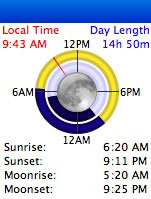
I’ve been working on Seasonality 1.4 and thought I would show a quick preview of the new moon-related features. The screenshot here shows the new sun/moon view in Seasonality. The look of this will probably change before 1.4 is released, but I think it’s looking pretty good so far.

Last week I got some code working to calculate the moonrise and moonset times, so those are now displayed in text along with the sunrise and sunset times. I also added a new moon ring within the sun ring to give a more graphical representation of what the moon is doing at any given moment. This ring also provides a pretty slick view for astronomers, who often do not want the moon to be out while viewing extraterrestrial bodies. Since the moon ring and sun ring time periods match, it’s easy to see when both the sun and moon will be out of the picture. In this screenshot, the sun and moon match up pretty closely, but that’s not always the case.

I couldn’t add moonrise and moonset without adding a moon phase display, so that’s coming in Seasonality 1.4 as well. In the center of the rings, the moon will be graphically drawn with the appropriate amount shaded. It’s accurate within 0.7% of the actual moon phase over the next 5+ years. One interesting thing I learned while adding the moon phase is that the synodic month (the amount of time between one new moon and the next) is gradually getting longer. This is caused by the moon moving further from the earth, at a rate of about 3.8 centimeters per year. Just another random tidbit of knowledge gained while working on Seasonality.

Conversion Rates

Rogue Amoeba put out this challenge for other Mac software developers to share their conversion rates. These numbers for Gaucho Software are for the month of March, which is the most recent month with an average amount of activity.

  Seasonality Dash Monitors XRG
Downloads: X 3.5X 3.7X
Sales: Y 0.3Y N/A
Conversion Rate: 6.9% 0.5% N/A

The conversion rate here for Seasonality is a little bit high. I checked a couple of other months and the rate was a more modest 4-5%. Looking at these numbers, it looks like the best way to increase my sales is to either get more people to try Seasonality, or to improve Dash Monitors enough to increase it’s conversion rate.

One interesting note is that even though XRG hasn’t been updated since the beginning of 2005, it is still my most downloaded product. Of course, this changes during a month with a Seasonality or Dash Monitors release. For example, so far this month with the release of version 1.3, Seasonality has been downloaded 3.5 times more often than XRG.

Seasonality 1.3

After 5 or so months of work Seasonality 1.3 is finally ready. Version 1.3 is a Universal Binary, and it runs much nicer on Intel Macs than 1.2 had previously. I’ve also made several code optimizations, so even if you don’t have an Intel Mac you will observe a noticeable speed increase, especially while working with the satellite image and graphs.

There are plenty of new features this time around. The biggest one is a new Weather Journal. You can create a journal entry for each day and Seasonality will automatically keep track of high/low temperatures and sunrise/sunset times for that day. Then add your own text or photos to the entry. It uses a standard NSTextView, so all the typical text editor properties are available. Thanks go out to whoever worked on NSTextView at Apple/NeXT for making it so easy. 😉

There’s also a new graph interface that’s pretty cool. I received a lot of requests to be able to show more than 2 graphs at once, so this new interface will allow users to show all 6 graphs at the same time.

Another big new feature is the new radar overlay imagery. Technically, the radar images are the same as they were before, but instead of being restricted to just showing radar imagery in the vicinity of your configured locations, now Seasonality will automatically fetch radar images for wherever you happen to be browsing in the U.S., Guam and Puerto Rico. A large piece of the code to support the new radar images is a new image overlay class I created. This will make it much easier to add additional image overlays at a later point in time, and even allow users to add their own image overlays eventually. I’m hoping to find suitable radar overlays for other parts of the world, another often-requested feature.

I’ve added a couple of tips to the General Seasonality Forum. Be sure to check them out and while you’re there, feel free to post some feedback. 🙂

St. Croix

Katrina and I took a much-needed vacation and spent the last week down on St. Croix in the Caribbean. I have to say, this is the best time of year to vacation down there. It’s off-season, so very few tourists were around and that made the trip much more enjoyable. St. Croix doesn’t get as many tourists as the other U.S. Virgin Islands (St. Thomas and St. John) to begin with. No crowds to compete with at the beach, traffic wasn’t an issue, and overall everything was much more relaxed.


We stayed at a resort that was right on the ocean, and our room happened to be on the first floor. We were able to walk off our back patio onto the sand, and it was gorgeous. Nothing beats reading on a hammock tied to two palm trees, snorkeling was just a short walk away, and the island is small enough that nothing is too far by car. Down there they drive on the left side of the road, which took some getting used to, but after a day or two it was second nature.

I’ll post some pictures to my Flickr account in the next few days. Of course a lot of things can happen in a week, and I’m still trying to catch up. Here’s some of the more notable online events…

Logtar interviews Dan Lacher: The weekend before we left, Logtar interviewed Dan Lacher at the local MiaMUG meeting. I was on the scene to take some pictures, which can be found on my Flickr page. The Podcast itself can be found on Logtar’s blog.

Happy Apps releases WebnoteHappy 1.0: Luis de la Rosa just released his first shareware application. Back in January, Luis released WebnoteHappy Lite, the free version of the app. I mentioned it here back then and all the same things apply for the full version. I gave Luis a quote about the software, and he ended up using it on the product page so that’s pretty cool. WebnoteHappy is a really great bookmark manager, so if you’re looking for something along those lines I would suggest checking it out.

Apple released the MacBook: Not going to say much about this because it’s been on all the news sites. It’s a pretty cool notebook though for a great price. Looks great in black too…

« Older posts Newer posts »

© 2026 *Coder Blog

Theme by Anders NorenUp ↑