Life, Technology, and Meteorology

Year: 2004 (Page 2 of 5)

A few belated updates…

I just wanted to point out a couple of apps that were updated in the past week or two. Both of these I use quite a bit, and get my highest recommendations.

The first is DesktopSweeper by Philippe Martin. I’ve been using this haxie since the first beta versions, and it’s definitely helped keep my desktop cleaner. Basically, it’s main function is to hide all of the icons on your desktop when you aren’t specifically in the Finder. When the Finder is your frontmost application, all of your icons are there, but when you switch away to do something else, DesktopSweeper will hide all the icons so they aren’t still cluttering your screen. It’s also nice because you can set a delay for how long to wait before hiding the icons. This makes it easy to be in the Finder, switch to another app to start a drag operation and drop it before the icons are hidden again. Version 1.1 was posted last week, so check it out.

The next app that I happen to be using right now is Blapp by Michael McCracken. Blapp is an app for all those bloggers out there using Blosxom. Editing is done in a nice split window where you can edit the source of the blog entry and see it rendered in HTML in real time on the other side of the window. Everything is made very robust, and setting up the configuration to sync with your blog is easy. Here is a link to the official Blapp page, but there isn’t an updated link to the version 7 download, so I included the link above where you can download the latest.

Moving Update

Well, it’s been awhile since I’ve posted anything here. Moving has turned out to be more intensive than I was expecting it to be. Things out here in Michigan are going pretty well for us. Our house still has random boxes scattered about, but at least we are at the point where we can be comfortable in some of the rooms. 🙂

I’ve starting the process of getting Gaucho Software off the ground. A lot of the work thus far has been more focused on system administration…setting up the web, database, DNS, and mail servers here and making sure everything is redundant and secure. I’ve found that RRDTool and Cacti together make a great tool to monitor all of the servers.

Since my office is in a finished bedroom of our basement, there are extra precautions that I have been taking in case the basement floods at some point. The sump pump is on a battery backup itself, so flooding should never be an issue, but I’m from the west, and just the possibility of this happening freaks me out. 🙂 The servers are all wired so there are no wires below the table they are on (except for one plug going from the UPS down to the electrical outlet). The UPS is new…our power has gone off a few times since we moved in so I thought it would be a good thing to have. I ended up getting a Belkin Enterprise Series 1100VA UPS and that has been working great so far. I’ve plugged three servers and all the network equipment into it, and it’s still running at only 25-30% load. This will give me about 45 minutes of backup battery for everything, which should be plenty.

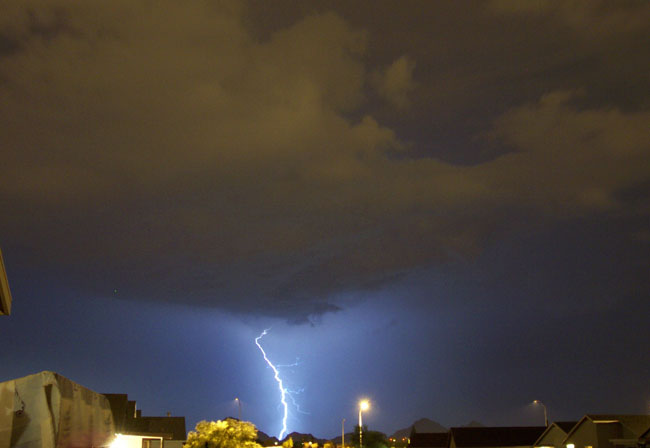
One thing I was going to miss when moving away from Tucson are the monsoons we would get there in the summer time. Monsoons are very intense storms, and they were incredible to watch. Little did I know that Michigan has some pretty good storms as well. Early this morning there was an incredible show. I awoke to see our bedroom glowing and lighting up like there was a TV turned on in a corner. Lightning was flashing more frequent than once a second, and there was so much thunder that I couldn’t distinguish it separately…it was just a constant combined rumble. Anyway, I think the storms here will do for some good entertainment. The only drawback is that most of the lightning here stays up in the clouds, where the monsoons in Tucson would generate a ton of cloud to ground lightning. Below is a picture I took from our back yard an evening last August during a monsoon.

WWDC Wrapup

Well, the week has finally come to a close, and WWDC ended with it. Overall, I had a great time at the conference, and I’ll definitely be returning in future years. Even though it was larger than O’Reilly’s Mac OS X Conference, it was still fairly easy to meet new people and get to know them. I had the pleasure of meeting many Mac developers at various official and unofficial evening events, including Buzz Andersen, Jason Deraleau, Jim Gaynor, Joe Heck, Mike McCracken, Joe Pezzillo, Andrew Pontious, and Jonathan “Wolf” Rentzsch. Also, I was happy to see some familiar faces from previous conferences including Gus Mueller and Brent Simmons. I’m sure I’m forgetting some people here, so if I didn’t mention someone, I apologize.

WWDC is one of those conferences where ideas are born. Most of the sessions were about current Mac OS X technologies or new ones that will be introduced in Tiger. They show you how to use them, and seeing demos in action really start the wheels spinning in your head as to how you can use them yourself. In other words, it’s a great place to be when trying to start working on a new application, like I am doing for Gaucho Software.

So now that this week is over, I have to get back to the real world. Katrina and I have less than a week to pack everything up at home and start driving across the country to Michigan. It’s an understatement to say that this week will be busy, but I’m sure things will work out well and we’ll be enjoying our new life in Michigan before we know it. Even though I’ve only been “unemployed” for a month, I’m anxious to get back to work and get my new company off the ground.

WWDC Keynote

Well, one of the few things here at WWDC I can talk about here on my blog is the Keynote address. Most people have probably already heard the news. New hardware was kind of scarce except for the new LCD displays that were announced. I must say that after seeing the new 30″ monitor up close, I was awestruck. This display is incredible and would be a welcome addition to my desktop if it was a tad more affordable. 😉

On the flip side, good software announcements have been plentiful. Tiger looks like it will be a nice OS upgrade with the Core Image and Core Video libraries. I’m sure the Konfabulator developers aren’t too happy about the new Dashboard functionality in Tiger, though it looks like Dashboard will be a welcome addition to the OS. Hopefully the Konfabulator developers will find features that add a lot of value to their software over what Apple offers.

Overall, it’s been a great conference so far and I’m looking forward to the rest of the week.

WWDC Next Week!

Well, tomorrow morning, I’m taking off to San Francisco for WWDC next week. For some reason, when I ordered the airline tickets, a 7am flight didn’t sound so bad…but having to wake up at 4:30am tomorrow morning isn’t something I’m looking forward to. 🙂

Something I am looking forward to is the conference. I registered for the Cocoa tutorial on Sunday, which sounds like it will be good. Even though I’ve been programming in Cocoa for a couple of years, it will be interesting to see different methods of doing things. The hope is that my next app will have more polish than XRG does, which is my first serious Cocoa application.

I’m also looking forward to the WWDC Weblogger Meetup on Monday evening. I posted about the Meetup a month or two ago when it was first being organized. It will definitely be cool to meet some of the other Mac Developer bloggers out there and have a good dinner to boot.

If anyone out there is going and want to meet up, send me an email!

Sun Ultra 10

I’m a big fan of classic computers. Even though I’m not too nostalgic of a person, there’s something about older computers that really gets to me. My first Mac was a Mac 512Ke, which my dad still has packed away at home because we couldn’t bring ourselves to part with it. There’s also a Mac II somewhere at my parents’ house along with the current family computer, a G4 Cube. A few years ago, I purchased a Mac SE/30 for $5, and that’s probably the best $5 I ever spent.

Well, when leaving Ephibian yesterday, I asked if they wanted part with any of their old Sun boxes. They had an Enterprise 450 and an Ultra 10 that haven’t been turned on for over a year (Ephibian is mostly a Linux shop now). Well, they ended up offering me the Ultra 10 at a very low price, and I didn’t hesitate on taking it.

It’s not an entirely impractical purchase like the SE/30 probably was. I need to get a new server for Gaucho Software, and I think this Ultra 10 will be enough of a box to do it. It has a 300Mhz UltraSPARC IIi chip in it, 384Mb of RAM, and two hard drives (4Gb and 3Gb), which I plan to replace soon. I spent most of last night doing a fresh installation of Solaris 7 on it. It’s interesting to see just how bare-bones of an OS Solaris is; even gcc and top don’t come standard, and bash which seems to have taken over as the shell of choice had to be installed separately as well. Personally, I’m a tcsh guy, so I’ll be installing that when setting up my user environment, after I finish installing all the primary packages that I want on there.

One thing I still need to think about is what desktop environment I’ll be using on it. My current favorite is KDE, but that seems like it will be too resource intensive and though I’m sure it will run, it isn’t really practical for this machine. In the past I’ve used GNOME, Enlightenment, WindowMaker, and even TWM (which is no longer maintained) on a SPARC 5 back in the day. At this point, I’ll take anything over CDE, which comes standard. I’ve never understood why Sun and HP both decided on bundling CDE as their primary desktop environment.

Finally, does anyone remember XEarth? I was browsing SunFreeware and came across it. Where are the apps for like this for Mac OS X today? Granted, there are some very nice shareware offerings, but I have yet to find one that is freeware like XEarth.

Recent Happenings…

Well, it’s been awhile since I’ve had a chance to write here, mostly because I have been really busy lately. As some of you may know, Katrina and I will be moving cross-country in July. Katrina has just completed her Ph. D. in Mathematics at the University of Arizona, and accepted a job opening as a professor at Central Michigan University. Come July, we’ll be moving to the small town of Mt. Pleasant. A couple of weeks ago we flew out there and purchased a house, and we are both pretty excited about the move.

What will I be doing in Michigan? Well, I’m taking this opportunity to start my own software company called Gaucho Software. I’ve had a lot of success with XRG, and believe that I will be able to create more useful software applications for Mac OS X. Look for a new application to be released sometime later this year.

So now I’m in a transitional period. Yesterday was my last day at Ephibian, where I have worked for almost 4 years now. I plan to take advantage of having some time off before WWDC at the end of this month and the big move after that.

Disabled Writebacks…

I’m sorry to say that I disabled posting writebacks to my blog this morning. In the past several days, I have gotten far more SPAM postings than messages from real people. While I have liked hearing from many of you, it’s just too much work to continue maintaining. I have, however, kept the links to writebacks that have already been posted, so anyone can still read those.

In the future, I welcome comments in the form of email. My email address is in the sidebar.

Personal Backups

Steven Frank of Panic posted an interesting blog entry about making personal backups. This is something that I am very concerned about since I have a lot of data spread across 5 different computers, and I don’t really care to lose it. 🙂 Here’s a listing on how I am covering my bases between machines.

First is my primary outside server, Shadow, which is an older 200Mhz PowerMac 4400 located in California running Linux. This box only has a 2Gb drive in it, so I don’t store much on here. But it’s enough space to serve this blog, the XRG web site, and some other services like Mail and DNS. The data that I do have on this box is rsynced nightly over to Proton, which I mention below. On a side note, this box has definitely served me well over the couple of years that I’ve used it. It’s not too quick at generating dynamic web content, but most pages that I serve (with the exception of this blog) is static content anyway, and it just goes without ever crashing. Right now it’s on an uptime streak of around 140 days (last reboot for an OS upgrade), and I have no plans to reboot it any time soon.

Proton is my other outside server. It’s a old HP with a 300Mhz Celeron which is also running Linux, and located at my office in Arizona. At the moment, it’s only primary service is to run the XRG Weather Server. Other services that it takes care of are secondary, such as Mail (secondary MX), and backups from Shadow. This box has a 4Gb drive in it, which is more than enough for running the weather server, and has plenty of space to spare for backups of Shadow. Since everything on this box can be reproduced fairly easily, I don’t have any backups of this machine. This box is also very reliable just like Shadow. It’s uptime is around 260 days at the moment.

Next is my internal file server at home, Epic, which is a 350Mhz PII running FreeBSD. This box has dual 60Gb drives with a 100Gb RAID 0 partition striped between them. The purpose of this box really is only as a file server running NFS and Samba, and it does the job well. The disks and CPU are plenty fast to saturate a 100Mbit connection and will probably do pretty well with a gigabit network I plan to start using in the future. This is the box that I’m having trouble backing up right now. 100Gb is a large partition to back up. There are a couple of smaller partitions on the disks that I use to back up my really important stuff, but that’s not a lot of protection. A couple of days ago I started hearing a strange noise come out of one of the hard drives, so I just went out and bought another disk (Seagate 120Gb 7200RPM drive) for this system to use as a backup drive. I plan to throw it in there tonight and back up everything I have on that box. I’m sure the drives in there will last awhile longer, but I wanted something else just in case…

Smallfry is a MiniATX 400Mhz PII that I have running Windows 2k. Even though I have a reasonably sized 20Gb disk in there, I don’t have anything important on this box, so there’s nothing to back up. I mostly use this box to sync my Palm (which is backed up on my Tungsten), and test out how web pages I create look in IE.

Finally, my Powerbook G4 is my main personal system. This has an internal 48Gb disk in it which has all my most important stuff. I back up some of this to Epic, and other stuff to an 80Gb external Firewire drive. The Firewire drive has been getting filled with stuff like music and home movies lately, but it will have to do for now.

I like the idea that a commenter on Steven’s blog had with creating a nice RAID 5 with several 250Gb disks. We have a setup similar to that here at my office with 6 250Gb disks giving over a terabyte of storage. It’s definitely nice to have, but I don’t think I need that much space, and it just doesn’t make sense to go out and buy a ton of space that I won’t use for several years.

Also, for those of you who are looking at setting up a decent rsync backup system that will save the state of files across several days, check out this online tutorial.
XRG 1.0 Released

Well, after a couple of months of hard work, I finished version 1.0 of XRG and released it this morning. I’m hoping to submit it as an entry in the Apple Design Awards this year, so I’ll be working on that next week. 🙂 Here’s a description of the changes for this version:

XRG 1.0 contains many new features and bug fixes. The primary new feature is a new machine temperature graph that will graph the temperature of different locations in your computer. Supported CPUs include PowerMac G5s, Aluminum Powerbook G4s, and iBook G4s. Other new features include the addition of uptime statistics to the CPU graph, the ability to drag XTF theme files to the graph to set graph colors*, a re-designed preferences panel with new icons, and the option to hide XRG’s dock icon (through a new contextual menu for the graph title bar). A complete list of changes and bug fixes can be found at http://www.starcoder.com/xrg/changelog.shtml.

As always, comments and suggestions are welcome. Visit the XRG Homepage.

* I’m sure Robb Beal will be happy about this one. With Spring, drag and drop is taken to the extreme (quite nicely might I add), and naturally he requested this feature for XRG. Look for more drag and drop functionality in the future.

« Older posts Newer posts »

© 2026 *Coder Blog

Theme by Anders NorenUp ↑